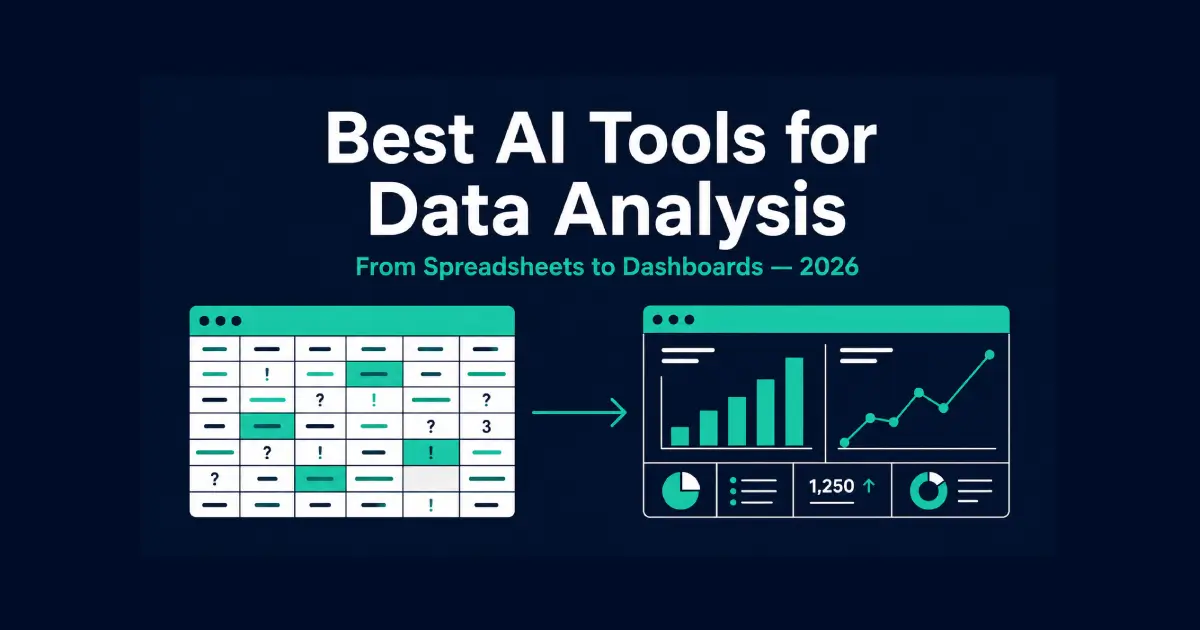
Best AI Tools for Data Analysis in 2026 — From Spreadsheets to Dashboards
Table of Contents
A spreadsheet with eighteen tabs nobody fully understands anymore. A dashboard built two years ago that still gets opened, even though half the metrics on it stopped mattering a year ago. A question from a manager — “why did this drop last month” — that takes three days to answer because pulling the right numbers means asking someone else first.
These analytics tools target that exact gap: the distance between having data and actually understanding what it means. Some genuinely close that gap. Others generate a chart faster than Excel would, which sounds useful and rarely is, since the chart was never the hard part — good visualization explains something, it doesn’t just render numbers as shapes.
The Short Answer
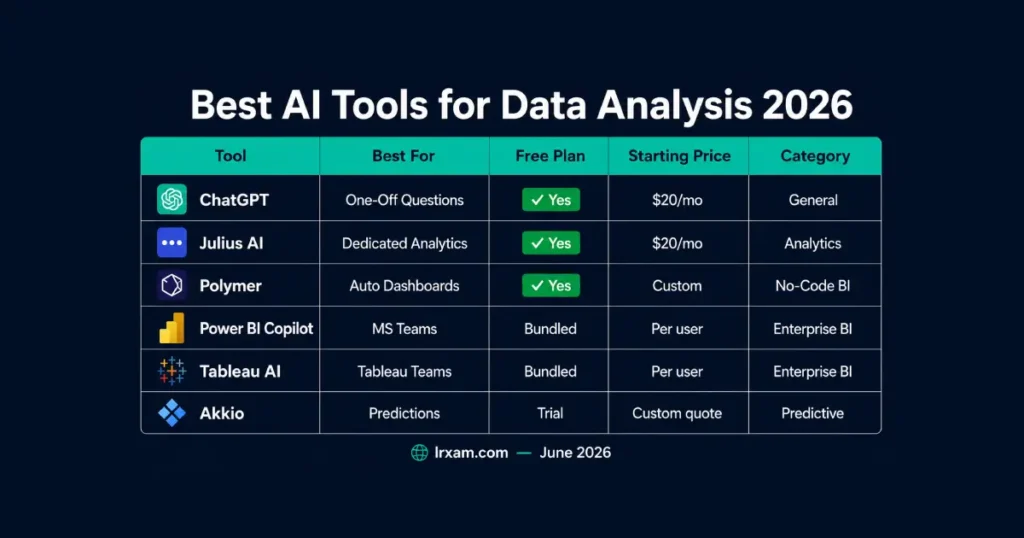
ChatGPT’s Advanced Data Analysis is the most accessible starting point for anyone who just needs to upload a spreadsheet and ask questions. Julius AI does the same core job with an interface built specifically around analytics rather than general chat. Polymer turns a raw spreadsheet into a usable dashboard automatically, without anyone building it by hand. Microsoft’s Power BI Copilot fits teams already running Power BI. Tableau AI plays the same role for teams on Tableau. Akkio handles predictive analytics — forecasting, churn, risk scoring — for teams without a data science background.
What “AI Data Analysis” Actually Solves
Two different jobs get lumped into this category, and they need different tools.
The first job is answering a specific question quickly: what happened, why, and what changed. The second job is building something durable — a dashboard, a recurring report, real visualization that other people check without needing a person to rebuild it each time. A tool that’s excellent at the first job is often mediocre at the second, and the reverse is just as true.
Raw data on its own answers nothing. A data analyst spends most of their actual time on the unglamorous part — cleaning, structuring, deciding what a column actually represents — before any visualization or chart becomes meaningful at all. The tools below split along that line. Some are built for a fast one-off answer. Others are built to become the dashboard a team actually keeps open. Picking based on which one sounds more impressive in a demo, rather than which job is the actual bottleneck, is the most common reason a new analytics tool gets abandoned within a month.
Best AI Tools for Data Analysis in 2026 — Full Breakdown
1. ChatGPT — The Most Accessible Starting Point
For a one-off question, ChatGPT‘s data analysis feature remains the lowest-friction option available. Upload a CSV or spreadsheet, ask a question in plain language, and it writes and runs the actual code behind the scenes, returning a chart, a table, or a direct answer depending on what was asked.
What makes this genuinely useful rather than a novelty is that it shows its work. Ask why revenue dropped in a specific region and it doesn’t just guess — it filters the data, runs the comparison, and shows the actual numbers behind the conclusion, often alongside a visualization that makes the pattern easier to see than a table of numbers would. As an ai assistant for a single question, that combination of transparency and a usable chart covers most of what a one-off analysis needs.
The limitation shows up at scale. Large files, recurring reports, and anything that needs real-time data staying live and updating automatically push past what a chat interface is built for. For a single dataset and a specific question, it’s hard to beat for the price.
Free tier available with usage limits. Plus at $20/month removes most of the friction around file size and session limits.
2. Julius AI — Built Specifically for Analytics
Julius AI does the same core job as ChatGPT’s data analysis feature — upload, ask, get an answer — but the entire interface is built around that single workflow rather than analytics being one feature inside a general chatbot.
The difference shows up in the details. Julius keeps a persistent view of the dataset alongside the conversation, so a follow-up question like “now break that down by region” doesn’t lose context the way a general chat history sometimes does. Statistical methods get applied more consistently too, since the tool is tuned specifically for this use case rather than handling analytics as one of dozens of possible tasks.
For someone doing analysis daily rather than occasionally, that narrower focus produces fewer small frustrations over a week of real use, even though the underlying capability overlaps significantly with what ChatGPT already does.
Free tier with limited monthly messages. Paid plans start around $20/month for higher usage and larger files.
3. Polymer — Automatic Dashboards From a Raw Spreadsheet
Polymer skips the step where someone has to design a data visualization layer before anyone can use one. Upload a spreadsheet, and it generates a usable set of charts and filters automatically, identifying which columns are likely categories, dates, or numbers worth tracking — a fast pass at exploratory data analysis without writing a single formula.
This is the right tool for a specific situation: data already exists, nobody has the time or the BI background to build a proper dashboard around it, and a working starting point beats a perfect one that never gets built. The automatic layout won’t match what a trained analyst would design intentionally, but it gets a team looking at their own data visually within minutes instead of weeks.
For recurring, structured reporting where the underlying metrics are well understood already, a dedicated BI platform still does more. For getting a first real look at a spreadsheet that’s been sitting unanalyzed, this removes the excuse not to.
Free tier available for smaller datasets. Paid plans scale with data volume and team size.
4. Microsoft Power BI Copilot — Best for Power BI Teams
For a business already running Power BI, Copilot inside it answers questions in plain language against data that’s already connected, modeled, and governed across a real data platform — rather than re-uploading a spreadsheet into a separate tool and starting from zero context each time. Data integration across multiple data sources happens once, upstream, instead of being redone for every question.
The real advantage here isn’t the AI layer in isolation. It’s that the AI is working with a data model someone already built properly, with correct relationships between tables and agreed-upon metric definitions. Asking “what drove the increase in Q2” gets an answer grounded in a semantic model the whole organization already trusts, not a fresh guess at what the columns in a spreadsheet probably mean.
The tradeoff is the same one that applies to every native-platform AI tool: it’s only as good as the existing setup. A business with a poorly maintained Power BI model gets a Copilot that confidently answers from bad foundations, which is arguably worse than no AI layer at all.
Pricing is bundled into existing Power BI and Microsoft 365 licensing tiers.
5. Tableau AI — Best for Tableau Teams
Tableau‘s AI features — generating insights automatically from trends already in a connected dataset, summarizing what changed in natural language — play the identical role inside Tableau’s data analytics suite that Power BI Copilot plays for Microsoft’s stack. The automation and AI layer here works on top of visualization that’s already built, not instead of it.
For a data team that’s already invested years into Tableau dashboards, workbooks, and a trained user base, this is additive rather than disruptive. Existing dashboards get a natural-language layer on top; nobody has to relearn the tool or migrate years of existing reporting to gain the new capability.
Outside an existing Tableau investment, there’s little reason to adopt it specifically for these AI features alone. The value is almost entirely about extending what a team already has, not about Tableau being uniquely better at the underlying AI compared to competitors.
Pricing follows existing Tableau licensing structures, with AI features rolling into current and new subscription tiers.
6. Akkio — Predictive Analytics Without a Data Science Team
Most tools on this list answer “what happened.” Akkio is built for “what’s likely to happen” — churn prediction, demand forecasting, risk scoring — without requiring anyone on staff who can build a machine learning model from scratch.
Upload historical data, pick what to predict, and it builds and evaluates a model automatically, explaining which historical data patterns mattered most in plain language rather than a coefficient table only a statistician would parse. The underlying ai and ml work happens behind the scenes — nobody on the team needs to analyze data at the model level to get a usable forecast out the other end. For a small or mid-size business that wants predictive capability but has no realistic path to hiring a data scientist, this closes a gap that previously required either that hire or doing without.
It won’t match a custom-built model from an actual specialist team on a genuinely complex problem, and it isn’t trying to. For standard, well-understood prediction problems — the kind most growing businesses actually face — automated and adequate beats custom and unaffordable.
Plans typically require a quote based on data volume and use case, though a trial is usually available to test against real data first.
A Few More Worth Knowing
For teams with data already living in a proper warehouse — Snowflake, BigQuery, Databricks — conversational ai tools like ThoughtSpot exist specifically for that more technical setup, translating a plain-language question into a real query against governed data. These require real implementation investment and aren’t a fit for a team without that infrastructure already in place.
Data cleaning and data preparation remain the unglamorous step that no AI tool here fully eliminates. Generative AI tools can suggest fixes for obvious problems — inconsistent date formats, duplicate rows — but a dataset with deep structural issues still needs human judgment before any of these ai models produce something trustworthy.
For ecommerce-specific analytics — tracking what’s actually driving revenue inside a store rather than general business data — our guide to AI tools for ecommerce covers Klaviyo and Nosto’s analytics layers in more depth than fits here. And for the broader productivity context around how data work fits into a daily workflow, our AI productivity tools guide covers Microsoft Copilot’s wider capabilities beyond just Power BI specifically.
How to Choose the Best AI Tools for Data Analysis in 2026
Start with the actual job, not the tool category. A single specific question — why did this number move — is best answered by ChatGPT or Julius AI, uploaded and asked directly, with results available in minutes. A recurring report that other people need to check regularly is a dashboard problem, which points toward Polymer for a fast start or Power BI and Tableau if the organization already has either platform in place.
Existing infrastructure should usually decide the platform question before any feature comparison happens. A business already running Power BI gains far more from Power BI Copilot than from adopting a completely separate tool, since the underlying data model and governance already exist. Starting from zero with a brand-new platform only makes sense when nothing usable already exists to build on.
Team composition matters as much as the tooling. A team with nobody who can write or check a SQL query needs tools built for that gap specifically — Polymer, Akkio, or a chat-based tool that shows its work clearly enough to be trusted. A team with existing analyst capability gets more value from tools that accelerate skilled work, like Power BI Copilot or Tableau AI layered onto infrastructure analysts already maintain, rather than tools built to route entirely around needing that skill set.
One pattern worth watching for regardless of which tool gets chosen: a confident-sounding wrong answer is more dangerous than an obviously broken one. A chart that fails to render gets noticed immediately. A statistic that’s subtly wrong because of a misunderstood column name or a filter applied incorrectly can sit in a report for months before anyone catches it. Spot-checking an AI tool’s first few answers against numbers you can verify manually is worth the time before trusting it with anything that reaches a decision-maker.

Frequently Asked Questions
What are the best AI tools for data analysis in 2026?
ChatGPT and Julius AI are best for one-off questions on a single dataset. Polymer is best for an automatic first dashboard. Power BI Copilot and Tableau AI are best for teams already on either platform. Akkio is best for predictive analytics without a specialist team. The right choice depends on whether the job is a one-time question or a recurring report.
Can ChatGPT actually do real data analysis?
Yes. ChatGPT’s data analysis feature writes and runs actual code against uploaded data, performing genuine statistical operations and showing the steps behind any conclusion. It struggles with very large files and isn’t built for recurring automated reporting, but for a bounded question against a single dataset, it performs reliably.
Do I need to know SQL to use AI data analysis tools in 2026?
No, not for tools aimed at general business users. ChatGPT, Julius AI, Polymer, and Akkio are all designed for plain-language interaction with no query writing required. Tools built for governed enterprise data warehouses still benefit from someone who understands the underlying schema, even when day-to-day use happens in plain English.
Should a small business use Power BI Copilot or a simpler tool like Polymer?
Use Copilot if Power BI is already set up; use Polymer if nothing is. A business with an existing Power BI setup gets clear value from Copilot since the modeling and governance work is already done. A business with no BI platform and an unanalyzed spreadsheet gets faster value from Polymer, which needs no setup investment first.
How accurate are AI-generated predictions from tools like Akkio?
Accurate enough for standard, well-documented problems with reasonable historical data — churn, demand forecasting. For unusual situations or sparse data, a tool like Akkio still produces a prediction, but the confidence behind it should be checked rather than assumed, the same way any model’s output deserves scrutiny.
What’s the difference between an AI chatbot for data and a full BI platform?
A chatbot answers one question well; a BI platform maintains a shared, governed view over time. ChatGPT or Julius AI handle a specific question without staying connected to live data. Power BI and Tableau are built for a persistent source of truth a whole team checks repeatedly. Most growing organizations need both.
Are AI data analysis tools worth it with very little existing data infrastructure?
Yes — that’s specifically the situation tools like Polymer and ChatGPT solve. Neither requires existing infrastructure to start producing value from an unanalyzed spreadsheet. A bigger infrastructure investment becomes worth considering only once that initial analysis reveals recurring questions worth tracking permanently.
How much do AI data analysis tools cost in 2026?
Most start free, with paid tiers from $20/month for individual tools. ChatGPT and Julius AI have free tiers, then roughly $20/month for heavier use. Polymer’s free tier covers smaller datasets. Power BI Copilot and Tableau AI bundle into existing platform licensing rather than charging separately. Akkio typically requires a custom quote.
Which AI tool is best for working with vast amounts of data?
Tools that connect directly to a database, not ones built around a single upload. ChatGPT and Julius AI hit practical file-size limits since they process one upload at a time. Power BI Copilot, Tableau AI, and Akkio connect directly to a database or warehouse, which is what makes them workable at real scale.
Can AI help transform raw data without writing code?
Yes, for common cleanup tasks. Tools across this list can identify inconsistent formats, suggest column types, and flag obvious duplicates in plain language, no code required. Deeper structural cleanup — reconciling two systems that define the same metric differently — still needs a person to make the judgment call first.