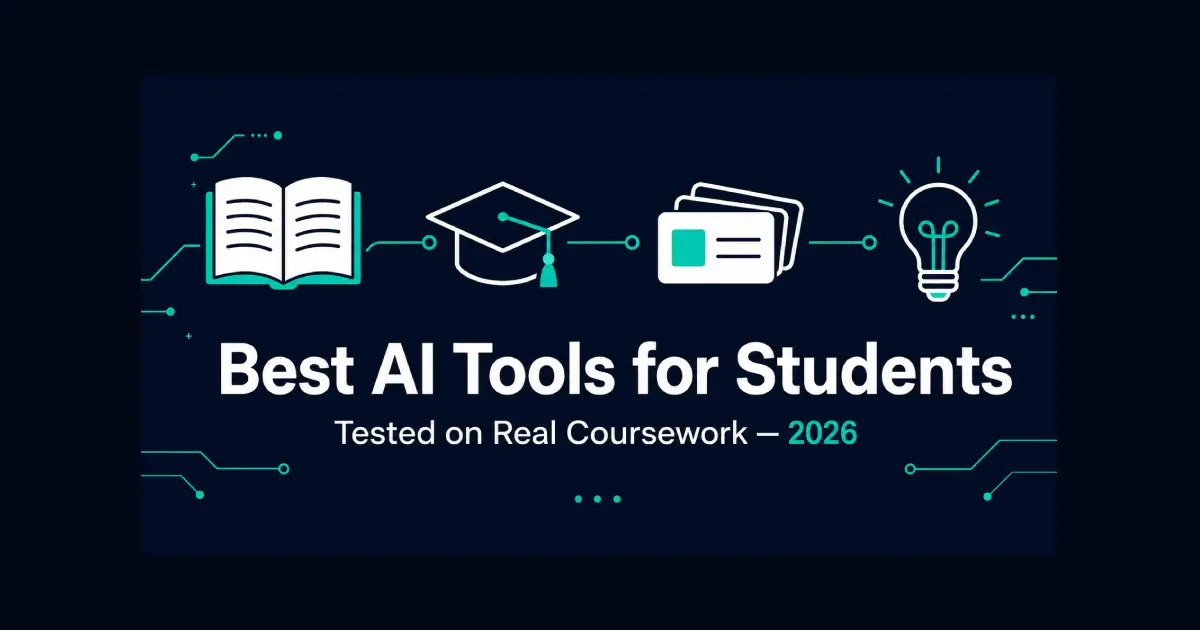
Best AI Tools for Students in 2026 — Tested on Real Coursework
Table of Contents
A reading list of 200 pages due Monday. A lecture recorded three weeks ago that never got reviewed. A stack of flashcards that should have been made back in week two and wasn’t. Every student has some version of this pile, and the honest question isn’t whether AI can help — it’s which tools actually help versus which ones just create a new app to check.
The best AI tools for students in 2026 cluster around a few real jobs: working through your own course material and readings, generating practice material that actually sticks, helping with research and citations, and solving STEM problems with shown work rather than just an answer. Used well, these digital tools remove the repetitive parts of studying. Used badly, they replace the thinking that’s the actual point of being in school.
The Short Answer
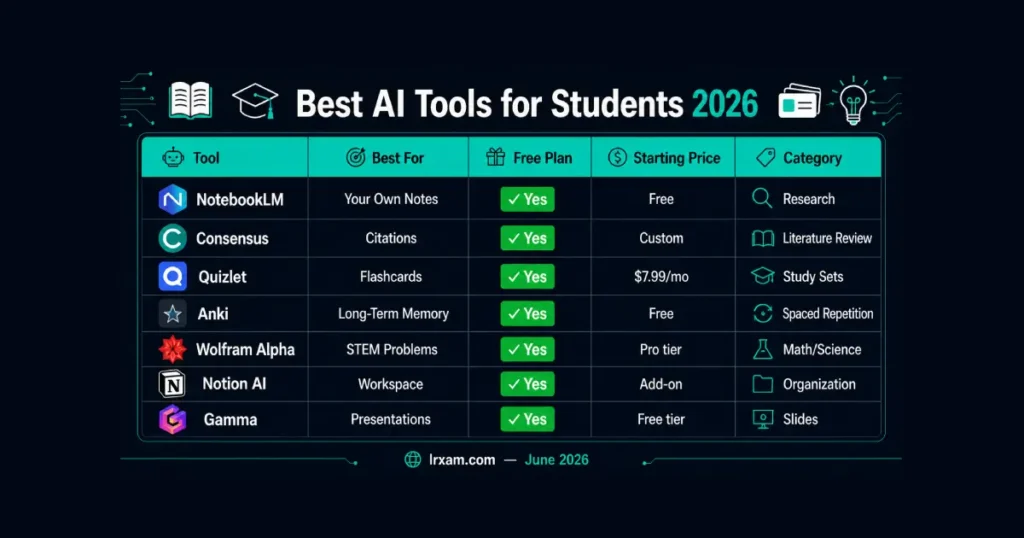
NotebookLM is the best for working directly from your own lecture notes, readings, and recordings. Consensus is the strongest option for academic literature review and finding cited sources for a paper. Quizlet leads on AI-generated flashcards and study sets. Anki remains the gold standard free option for long-term spaced repetition, especially in memorization-heavy fields. Wolfram Alpha is built for STEM problem-solving with shown steps. Notion AI works best as an all-in-one academic workspace. Gamma turns rough notes into a usable presentation in minutes.
Where the Line Actually Sits
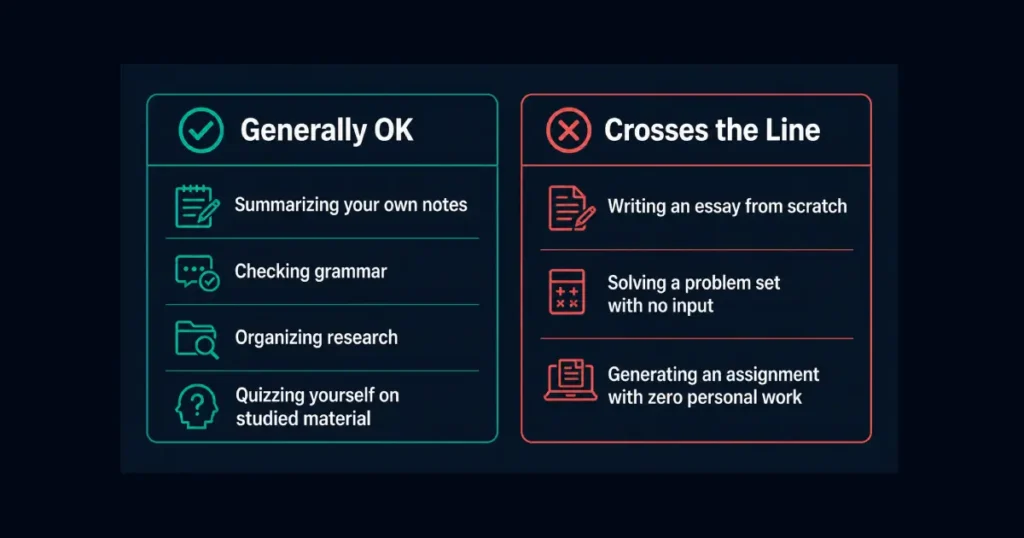
Most university policies in 2026 draw a real distinction, even when the wording sounds vague. Using AI to summarize your own notes, check grammar, organize research, or quiz yourself on material you’ve already studied is treated very differently from having AI write the actual essay or solve the actual problem set you’re being graded on.
The tools that hold up under scrutiny are the ones working from material you’ve already engaged with — your own readings, your own lecture notes, your own draft. A tool that generates an essay from a topic prompt with no input from you is the version that gets students into academic integrity trouble, and it also happens to be the version that teaches the least. The tools below are organized with that distinction in mind, not just by feature list.
Best AI Tools for Students in 2026 — Full Breakdown
1. NotebookLM — Best for Working From Your Own Material
NotebookLM is Google’s research assistant built around a specific constraint that turns out to be its biggest strength: it only answers from documents you upload, rather than pulling from its general training data. Upload lecture slides, readings, and your own notes, and it answers questions, generates summaries, and builds study guides grounded entirely in that material.
That constraint is what makes it genuinely useful for serious studying rather than a shortcut around it. Ask “what did the professor say about enzyme kinetics” and it pulls the answer from your actual uploaded lecture notes, not a generic textbook explanation that might not match what was actually taught. The audio overview feature, which turns uploaded material into a podcast-style discussion, is the feature most students mention first, though the source-grounded Q&A is the part that holds up best under exam pressure.
Free to use with a Google account, with usage limits that are generous enough for most coursework.
2. Consensus — Best for Literature Review and Citations
Writing a paper that needs actual academic sources is a different problem than writing a five-paragraph essay, and Consensus is built specifically for that gap. Ask a research question and it searches published academic papers, summarizes what the evidence actually shows, and links directly to the sources it pulled from.
What separates it from asking a general AI tool the same question is the citation trail. A general writing assistant might confidently summarize “the research,” with no way to verify that research exists. Consensus shows the actual papers behind every claim, which matters enormously for anything that needs a real bibliography rather than AI-generated text dressed up as a citation.
For literature review work specifically — finding what’s already been studied before writing a research proposal — this consistently outperforms a general search engine alone, and it’s more reliable for citations than asking ChatGPT or Gemini to “find some sources” without verification.
- Free tier covers basic searches. Premium unlocks deeper analysis and higher usage limits.
3. Quizlet — Best AI-Generated Flashcards and Study Sets
Quizlet turns uploaded notes or textbook pages into flashcard sets automatically, which removes the single most tedious part of exam preparation: actually building the deck before you can start studying from it.
The adaptive mode is what separates this from a static flashcard app. It tracks which terms you consistently get wrong and weights study time toward those specifically, rather than cycling through every card with equal frequency regardless of how well you already know it. Practice tests and matching games add variety for material that gets genuinely boring to drill the same way every session.
A 2026 meta-analysis covering more than 21,000 learners found a large measurable benefit from spaced repetition for long-term retention specifically — which is the mechanism Quizlet and tools like it are built around, not just a study trend without evidence behind it.
Free plan covers basic flashcard creation and millions of existing study sets. Plus runs $7.99/month or $35.99/year for unlimited AI-generated sets and offline access.
4. Anki — The Free Standard for Serious Memorization
Anki doesn’t have flashy AI branding, and that’s part of why medical, language, and other memorization-heavy students keep coming back to it. The spaced repetition algorithm underneath it has been refined for over a decade, scheduling reviews right before you’re statistically likely to forget something rather than on a fixed daily schedule.
It’s less polished than Quizlet and the AI-assisted card generation is more basic, usually requiring a plugin or manual setup rather than the slicker upload-and-generate flow newer tools offer. What it offers instead is complete control, a massive library of community-shared decks for specific courses and textbooks, and zero cost on desktop and Android.
For a single semester of light studying, Quizlet’s polish probably wins. For multi-year retention — anatomy that needs to stick through boards, vocabulary that needs to stick for years — Anki’s algorithm earns the rougher interface.
- Completely free and open-source on desktop and Android. A one-time purchase covers the iOS app.
5. Wolfram Alpha — Best for STEM Problem-Solving With Shown Work
Wolfram Alpha solves math, physics, chemistry, and engineering problems and — critically for actually learning the material — shows the steps rather than just the final answer. Type in an equation, a derivative, a chemical formula, and it returns a worked solution you can actually follow and learn from.
This is different from asking a general AI chatbot the same question. General AI tools occasionally make computational errors that sound confident and look plausible. Wolfram Alpha is built on a symbolic computation engine rather than a language model guessing at math, which makes it considerably more reliable for anything where the actual numeric or symbolic answer matters and needs to be exactly right.
The free version covers most standard coursework. Wolfram Alpha Pro adds step-by-step solutions for more complex problems and removes ads.
6. Notion AI — Best All-in-One Academic Workspace
Notion AI works best once it’s sitting on top of notes and material you’re already keeping inside Notion, rather than generating study content from nothing. Summarizing lecture notes, building a study guide from existing readings, and brainstorming an essay outline all happen inside the same workspace where assignments and deadlines already live.
The setup overhead is real — Notion rewards the student willing to build a system, and it does very little for someone who opens it once and expects instant organization. For someone willing to put in that initial setup, having notes, task tracking, and AI summarization in one connected workspace removes the friction of switching between five separate apps every study session.
Free for individual students with generous usage limits. Its add-on pricing applies for higher-volume use, but the core note-taking and workflow features stay free at the individual tier.
7. Gamma — Best for Turning Notes Into a Presentation Fast
Every student eventually hits the assignment that needs slides, and Gamma exists specifically for the gap between “the content is done” and “the slides look professional.” Paste in notes, an outline, or even a rough paragraph, and it generates a clean, structured presentation in minutes.
It won’t win a design award, and the layouts are recognizable once you’ve seen a few. What it does is get a presentation roughly 80% finished instantly, leaving the actual time budget for swapping images, tightening specific slides, and rehearsing — rather than spending three hours on layout before any of that.
Free tier covers a reasonable number of presentations per month, which is enough for most coursework without ever needing the paid plan.
A Few More Worth Knowing
For recording and searching lecture audio specifically, Otter.ai — covered in our broader AI productivity guide — transcribes lectures in real time and lets you search the transcript afterward, which pairs well with NotebookLM once the recording exists.
For proofreading and grammar on essays and papers before submission, our full comparison of AI grammar checker tools covers which option catches the most without flattening your own voice. And for general brainstorming, outlining, or acting as an on-demand ai tutor explaining a concept in simpler terms, ChatGPT and Claude remain the flexible starting point covered in our AI writing tools guide. Perplexity AI is another solid research tool worth knowing for quick, cited answers to factual questions while reading.
How to Choose the Right Tools for Your Workload
Match the tool to the actual bottleneck, not the most-hyped app this semester. If lectures are the problem — too fast, too much to write down — NotebookLM plus a transcription tool solves that directly. If retention over time is the issue, especially in a memorization-heavy field, Anki’s spaced repetition earns the learning curve. If a research paper needs real sources, Consensus saves hours that manual searching alone would waste.
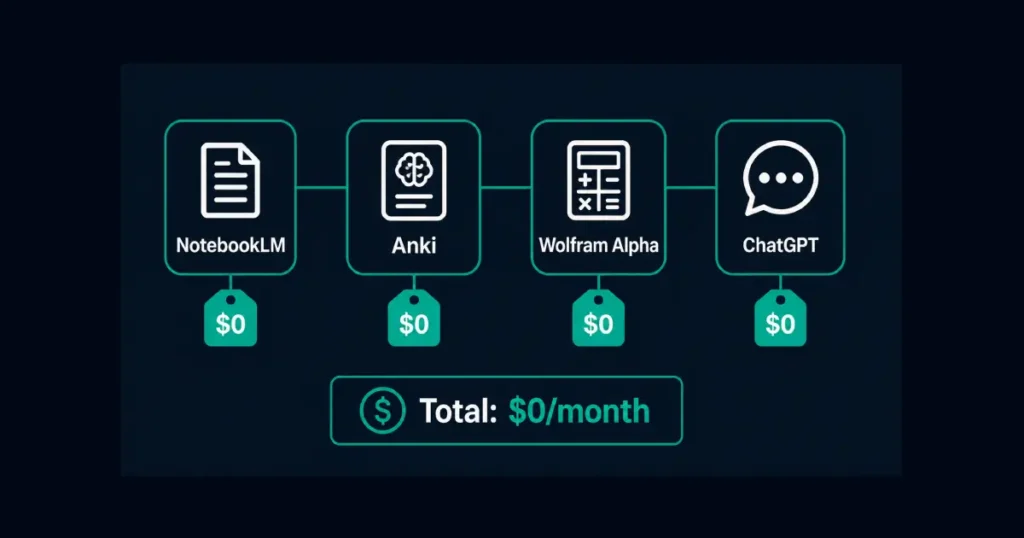
A genuinely free stack covers most of a semester: NotebookLM for source material, Anki or Quizlet’s free tier for review, Wolfram Alpha for STEM coursework, and ChatGPT’s free tier for explanations and brainstorming. Students already inside the Microsoft ecosystem often layer OneNote on top for basic note storage, though it adds little AI capability on its own compared to the dedicated tools above. Total cost: $0. Add a paid tier only once a specific free limit becomes the actual bottleneck, not because a subscription seems like it should help in the abstract.
The pattern that holds across every studying method actually backed by research: active recall and spaced repetition outperform passive re-reading by a wide margin. The tools above work because most of them are built around that mechanism specifically — generating practice questions, scheduling review at the right interval, forcing retrieval rather than recognition. A tool that just summarizes material faster doesn’t replace the part where you have to actually pull the answer out of memory yourself.
One pattern worth naming directly: a new student-facing AI app launches every few weeks, each one claiming to be the one tool that replaces everything else. Almost none of them do. The tools that have stuck around — Anki for over a decade, Wolfram Alpha even longer — earned that staying power by doing one job reliably rather than promising to do every job adequately. Before adding a new app to the stack, it’s worth asking whether an existing tool already covers that job, just without the marketing push of a brand-new launch.
Frequently Asked Questions
What are the best AI tools for students in 2026?
NotebookLM is the best for working from your own lecture notes and readings. Consensus leads for academic literature review and citations. Quizlet generates AI flashcards and study sets effectively. Anki remains the free standard for long-term spaced repetition. Wolfram Alpha handles STEM problem-solving with shown steps. Notion AI works as an all-in-one academic workspace. Gamma turns notes into presentations quickly. The right combination depends on which part of studying takes the most time.
Will using AI tools get me in trouble for academic integrity?
Not if you use AI as a study aid rather than to do the work for you — what matters is how it’s used, not which tool. Using AI to summarize your own notes, organize research, generate practice flashcards from material you’ve studied, or check grammar is generally accepted at most universities in 2026. Having AI write an essay or solve a problem set from scratch, with no input from your own work, is what crosses into academic integrity violations almost everywhere — and AI detection tools used by instructors have gotten more reliable at flagging exactly that pattern. When in doubt, check your specific course syllabus — policies vary significantly between professors even within the same university.
Are there good free AI tools for students?
Yes, and a genuinely free stack covers most coursework. NotebookLM is free with a Google account. Anki is completely free and open-source. Wolfram Alpha’s core functionality is free. Quizlet and Gamma both have usable free tiers with limits that cover light-to-moderate use, and most workspace and note-taking tools offer a similar free entry point. Grammarly’s free tier handles basic proofreading on top of any of these. Most students can study an entire semester on free tiers alone and only need to consider paying once a specific limit becomes a real constraint.
Which AI tool is best for writing research papers?
Consensus for finding and citing real academic sources during the research phase. ChatGPT or Claude for brainstorming structure and explaining complex source material in simpler terms — covered in more depth in our AI writing tools guide. A grammar checker as the final pass before submission. None of these should write the actual argument or analysis — that part needs to come from the student for both integrity and learning reasons.
Can AI tools actually help with memorization?
Yes, specifically because tools like Anki and Quizlet are built around spaced repetition and active recall, which research consistently shows outperforms passive re-reading for long-term retention. The AI layer helps by generating the practice material faster — turning notes into flashcards automatically — but the underlying learning mechanism is decades-old cognitive science, not something new the AI invented.
Is Wolfram Alpha better than asking ChatGPT for math help?
Yes for precise computation — Wolfram Alpha calculates exactly while ChatGPT sometimes makes confident computational errors. Wolfram Alpha runs on a symbolic computation engine built for precise calculation, while general AI chatbots occasionally make confident-sounding computational errors since they’re predicting likely text rather than calculating an exact answer. For understanding a concept in plain language, a general AI assistant explains things more conversationally. For getting the actual computation right, Wolfram Alpha is more reliable.
How much should a student expect to spend on AI study tools?
Realistically, $0 to $15 a month covers most needs. NotebookLM, Anki, and Wolfram Alpha’s core features are free. Quizlet Plus runs $7.99/month if the free tier’s limits become restrictive. Gamma and most ai-powered workspace tools have free tiers generous enough for typical coursework. Students in research-heavy programs may find Consensus’s premium tier worth the cost once literature review becomes a regular task rather than a once-a-semester project.
Do these tools work for non-English coursework?
Most tools handle multiple languages, but academic research coverage skews toward English-language publications. NotebookLM and Consensus handle multiple languages reasonably well for summarization and search, though academic source coverage skews heavily toward English-language publications in certain fields. Anki’s flashcard format works in any language since it’s just structured content review, which is part of why it remains popular for language learning specifically. Wolfram Alpha’s math and science computation works independent of language since the underlying queries are largely symbolic.