Best AI Writing Assistant for Business in 2026 — From Inbox to Reports
Table of Contents
Most professionals don’t have one writing problem. They have a dozen small ones spread across a day: a reply that needs to sound firmer than the first draft, a status report due in twenty minutes, a proposal that needs to match three other documents in tone, an inbox that never actually reaches zero.
The best AI writing assistant for business in 2026 isn’t one tool that does everything adequately. It’s usually one platform that handles the inbox and a separate one for longer documents, chosen based on which system the business already runs on. Picking the best ai writing tools based on hype rather than what’s actually installed tends to add a subscription nobody fully adopts — and most business use cases need a dedicated tool for one specific job, not a generic all-purpose writer.
The Short Answer
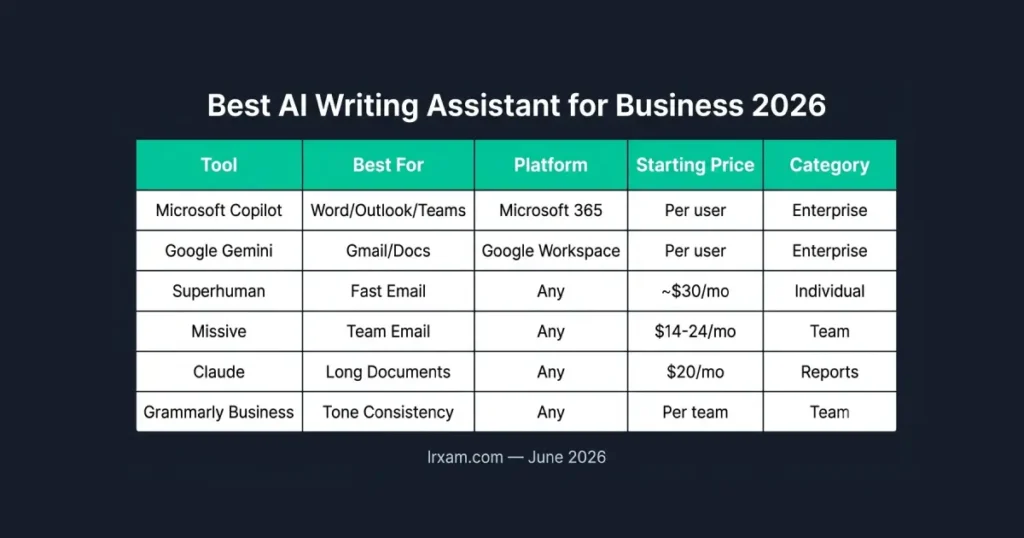
Microsoft Copilot is the obvious choice for any business already running on Word, Outlook, and Teams. Google Gemini fills the same role inside Gmail and Google Docs for Workspace-based teams. Superhuman is the fastest option for individuals handling high email volume who don’t need a team feature set. Missive is the strongest pick for teams that want shared email plus AI connected to other business tools. Claude handles long business documents and reports with more care than a quick-draft tool. Grammarly Business keeps tone and style consistent across a whole team’s written communication.
Why Platform Matters More Than Features Here
Every business writing tool comparison eventually says the same thing in different words: the best fit depends on where the writing already happens, not which ai writing platform has the longest feature list.
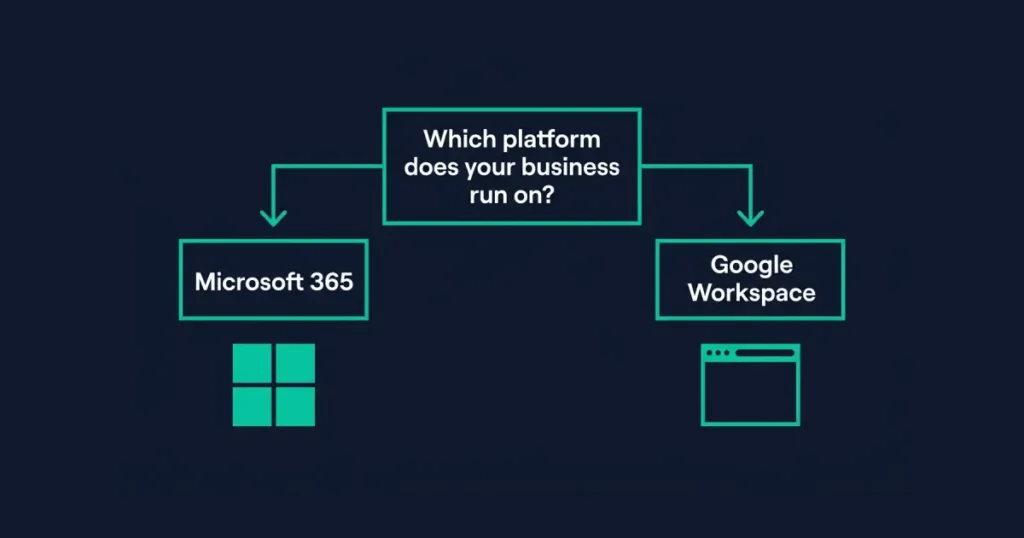
A team on Microsoft 365 gets Copilot bundled into tools people already open daily — Outlook, Word, Teams — with zero switching cost. A Google Workspace team gets the same advantage from Gemini inside Gmail and Docs. Adopting a third-party tool that requires leaving either ecosystem adds friction that kills adoption within a few weeks for most content teams, regardless of how good the underlying ai systems are.
That’s why the picks below split clearly by what’s already installed, rather than ranking everything on one universal scale. The right answer for a Microsoft shop and a Google Workspace shop are genuinely different ai platforms, not the same tool with different branding. A business owner evaluating this category for the first time should treat the platform question as settled before looking at any feature comparison at all.
Best AI Writing Assistant for Business in 2026 — Full Breakdown
1. Microsoft Copilot — Best for Microsoft 365 Businesses
Microsoft Copilot is built directly into the apps a Microsoft-based business already runs every day. In Outlook, it drafts replies, summarizes long threads, and adjusts tone before sending. In Word, it drafts reports and proposals from a rough outline and helps restructure sections that aren’t landing. In Teams, it summarizes meetings and turns discussion into action items without anyone manually taking notes.
The integration depth is the actual selling point, not any single writing feature in isolation. Nothing needs installing, no data needs exporting between systems, and the AI has context from calendar, email, and documents that a standalone tool would never see. For a legal, finance, or operations team handling formal correspondence daily, that native fit reduces friction in a way a third-party tool can’t fully replicate.
The tradeoff is cost and commitment to the Microsoft ecosystem specifically. Copilot pricing runs per user on top of an existing Microsoft 365 subscription, and the value drops sharply for a business not already centered on these tools.
2. Google Gemini — Best for Google Workspace Businesses
Gemini plays the identical role inside Gmail, Docs, and Sheets that Copilot plays inside Microsoft’s suite. Drafting replies, summarizing threads, suggesting edits to a Google Doc report — all without leaving the app a Workspace-based team already lives in daily.
What distinguishes Gemini from Copilot in practice is search integration. Asking it to find a specific email thread or pull a number from a spreadsheet pulls from data already inside Workspace, rather than requiring a separate search step. For a sales or customer-facing team that references past correspondence constantly, that retrieval speed matters as much as the drafting itself.
- The same ecosystem logic applies in reverse: a business running Microsoft 365 gains little by adding Gemini specifically for this use case, since the integration advantage only exists inside Google’s own suite of tools.
3. Superhuman — Best for Fast, High-Volume Individual Email
Superhuman built its reputation on raw speed before AI was part of the conversation, and the AI layer added since fits that same philosophy. Write with AI drafts replies in a voice trained on your own past emails. Instant Reply suggests one-tap responses for routine messages. Auto Summarize compresses long threads into a few sentences before you decide whether to even open them fully.
This is built for an individual professional drowning in volume, not for team-wide rollout. The keyboard-first interface has a real learning curve, and the pricing reflects a premium individual productivity tool rather than an enterprise platform priced for hundreds of seats.
For someone processing 100+ emails a day who has tried generic inbox AI and found it too shallow, Superhuman’s depth on the email-specific use case is hard to match. The tradeoff is that none of this depth transfers to documents, reports, or anything outside the inbox — it’s a focused tool that does one job extremely well rather than a general business writing platform.
4. Missive — Best for Team Email With Business Tool Context
Missive solves a problem neither Copilot nor Gemini handles particularly well: a shared team inbox where AI needs context from other business systems, not just the email thread itself.
Built-in integrations with Notion, Linear, Stripe, and other systems via Model Context Protocol mean the AI can pull a customer’s billing status or reference internal documentation without anyone leaving the email thread to check a separate dashboard. That’s a meaningfully different capability than a basic ai writer that only sees the words already in the inbox — it’s the difference between AI that helps you write and AI that does the lookup work first.
The thread-bundle interface takes a few days to adjust to for anyone coming from a traditional inbox layout, but most teams report the adjustment pays off once shared templates and shared labels are set up across the team.
5. Claude — Best for Long Business Documents and Reports
When the writing task is a ten-page proposal, a detailed report, or anything where getting a specific number or claim wrong actually matters, Claude handles that more carefully than a tool optimized for fast drafting. It maintains structure and tone across long documents without drifting, and it’s less likely to confidently state something incorrect along the way.
The workflow that holds up best: paste in research, data, or a rough outline, and ask for a structured first draft rather than a finished document. Reports and proposals still need a human pass for company-specific context and judgment, but the structural first draft saves real hours compared to staring at a blank document.
This isn’t an inbox tool and isn’t trying to be. For the specific category of business writing that’s long, formal, and high-stakes, it’s the stronger choice over a tool tuned for speed on short replies — the kind of document a client or a board reads carefully rewards the extra care over the extra speed.
6. Grammarly Business — Best for Team-Wide Tone Consistency
Most people know Grammarly as a personal grammar checker — we cover that version in detail in our guide to AI grammar checker tools. The Business tier is a different product aimed at a different problem: keeping tone, style, and terminology consistent across every person on a team writing customer-facing or internal communication.
Brand tone profiles let an admin set the voice the whole team should write in — formal or casual, the preferred terms for company products, banned phrases that shouldn’t appear in client-facing writing. Every team member’s drafts get checked against that shared standard automatically, rather than relying on individual writers remembering style guidelines from a document nobody re-reads after onboarding.
- For a team of five or more people writing under one company name, that consistency layer solves a real problem that individual grammar checking doesn’t touch.
A Few More Worth Knowing
For teams that already use ChatGPT or Claude for general writing tasks, those tools extend naturally into business writing without a dedicated business-specific subscription — the difference is mainly prompting for a more formal register rather than needing different software entirely. Tools like ChatGPT and Copy.ai are general-purpose writing software rather than business-specific platforms, which is exactly why they work well as a starting point before a business has identified which specific gap needs a dedicated tool.
For marketing-facing business writing specifically — campaigns, ad copy, customer-facing content generation at scale — Jasper, covered in our content creation guide, extends its brand-voice training to email and proposal templates as well, which is worth knowing if content marketers already run campaigns through it. Content strategies that already lean on Jasper for marketing rarely need a second platform just for internal business writing.
One adjacent concern worth naming honestly: some businesses ask whether AI-generated content needs to read as more “human” to avoid scrutiny from AI detection tools. For internal business writing, this rarely matters — nobody is running a status report through a detector. For client-facing proposals or public content, the better fix is adding genuine company-specific detail and judgment rather than chasing detection tools directly, since well-written, specific business content naturally reads as authored by a person regardless of which tool drafted the first pass.
How to Choose the Best AI Writing Assistant for Your Business in 2026
Start with the platform question, not the feature comparison. A Microsoft 365 business should default to evaluating Copilot first. A Google Workspace business should default to Gemini. Looking past the platform a business already runs on, toward a flashier standalone tool, is the most common reason adoption fails within the first month — people default back to whatever’s already open.
Past that platform decision, the second question is volume versus formality. High email volume with mostly routine replies points toward a speed-focused, top ai option such as Superhuman or the native platform assistant. Formal, high-stakes documents — proposals, reports, anything reviewed by legal or a client before going out — point toward something with a more careful writing style, such as Claude, rather than the fastest available draft.
Team size changes the calculation too. A solo professional or a small team of two or three rarely needs Grammarly Business’s tone-consistency layer or Missive’s shared-inbox tooling — those solve coordination problems that only exist once a team is large enough that individual writing habits start visibly diverging. Below that size, the native platform assistant plus a personal grammar checker usually covers what’s needed without adding a tool built for a coordination problem the business doesn’t have yet.
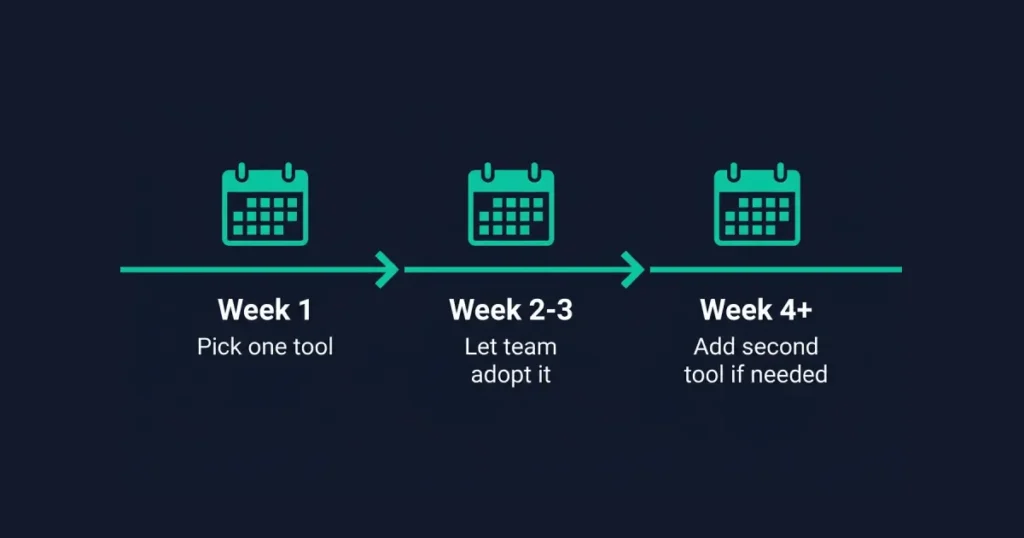
Rollout order matters more than most teams expect. Turning on every form of ai assistance across email, documents, and a tone-consistency layer in the same week overwhelms people who were managing fine with none of it a month earlier. Starting with whichever single tool addresses the loudest complaint — usually email volume — and giving the team a few weeks to actually adopt it before layering on a second tool produces far better long-term usage than rolling out the entire stack at once and hoping it sticks. Free ai tiers on most of these platforms make that gradual rollout low-risk to test before committing budget to a wider deployment.
Frequently Asked Questions
What is the best AI writing assistant for business in 2026?
Use Copilot if you run Microsoft 365; use Gemini for Google Workspace; use Claude for standalone long documents. Microsoft Copilot is the best choice for Microsoft 365 businesses. Google Gemini fills the same role for Google Workspace. Superhuman suits individuals handling high email volume. Missive fits teams needing shared inboxes with business tool context. Claude is the strongest option for long, formal documents. Grammarly Business handles team-wide tone consistency. The right pick depends on existing tools, team size, and whether the priority is speed or formality.
Is Microsoft Copilot or Google Gemini better for business writing?
Neither is universally better — Copilot fits Microsoft 365 teams; Gemini fits Google Workspace teams. The ecosystem decides. Copilot has the integration advantage inside Word, Outlook, and Teams. Gemini has the same advantage inside Gmail, Docs, and Sheets. Adding either tool to the opposite ecosystem provides little benefit, since the core value comes from native integration rather than the underlying AI model being meaningfully different.
Can ChatGPT or Claude replace a dedicated business writing tool?
Yes, for many small teams — dedicated tools mainly add ecosystem integration and team coordination features. ChatGPT and Claude both handle emails, reports, and proposals competently with the right prompting, without a business-specific subscription. The dedicated tools above earn their cost mainly through deep integration with existing email or document platforms, or through team-coordination features like shared tone profiles, that a general-purpose AI assistant doesn’t provide on its own.
How much do AI writing assistants for business typically cost?
Costs run -30/user/month for most tools; ChatGPT and Claude are /month per user. Microsoft Copilot and Google Gemini are typically priced per user on top of an existing 365 or Workspace subscription. Superhuman and Missive run in the $14-30 per user per month range depending on plan. Grammarly Business pricing scales with team size. Claude and ChatGPT’s paid tiers run around $20/month per user, with usable free tiers for lighter use. Most businesses find their actual cost driven more by team size than by which specific tool gets chosen.
Do I need a different tool for emails versus longer documents?
Often, yes, and that split shows up clearly in this category. Fast-drafting options such as Superhuman or the native platform assistants handle high-volume routine email well, but the same speed-focused approach can fall short on long-form content where structure and accuracy matter more than speed. The content type decides the tool more than personal preference does — many businesses end up using the native platform tool for daily email and Claude specifically for longer, higher-stakes documents.
Is it safe to use AI writing tools for confidential business communication?
Generally yes for reputable platforms, but review each vendor’s data policy before connecting sensitive business communications. Most reputable tools in 2026 use secure authentication, clear data permission scopes, and admin controls, but policies vary by vendor and by exactly what data the tool can access. Enterprise tools like Microsoft Copilot and Google Gemini generally offer stronger data governance controls suited to regulated industries than smaller standalone email AI tools. Reviewing a specific vendor’s data handling policy before connecting it to sensitive business communication is worth the time it takes, especially for legal, healthcare, or financial correspondence.
What’s the difference between an AI writing assistant and an AI agent for business email?
An assistant drafts when asked through conversational ai — you write a quick instruction, it produces ai content, you review and send. An agent goes further, reading incoming messages, classifying them, drafting responses, and sometimes routing them to the right person largely without a person initiating each step, typically with human review before anything actually sends. Most businesses start with assistant-style tools and move toward agent-style automation only once the team trusts the tool’s judgment on routine, lower-stakes messages.
How long does it take a team to actually adopt a new AI writing tool?
Realistically, two to four weeks for most teams to move from “installed” to “actually used daily.” The first week is usually spent on basic setup and a few people testing features. Real adoption happens once individuals find one specific recurring task — summarizing a certain type of meeting, drafting a certain type of reply — where the tool reliably saves time. Tools that get abandoned within that window almost always failed to find that one anchor use case rather than failing on overall quality.
Should a business pick one writing tool or several?
Most growing businesses end up with two: a native platform assistant for daily email and routine writing, plus one specialized tool for whichever specific gap the platform tool doesn’t cover — long documents, team tone consistency, or high-volume individual email. Trying to consolidate everything into a single tool usually means accepting mediocre performance on at least one of those jobs, since no single product on this list is built to excel at all of them simultaneously.
Is generative AI writing assistance reliable enough for client-facing business content?
For a first draft, yes — but generative ai output still needs a human pass for company-specific accuracy before anything goes to a client. The writing assistance these platforms provide is strongest at structure, tone, and speed; it’s weakest at knowing details specific to a deal, a client relationship, or internal context that was never written down anywhere the AI could read it. Treating any of these tools as a finished-document generator rather than a fast first draft is where business use cases tend to go wrong.