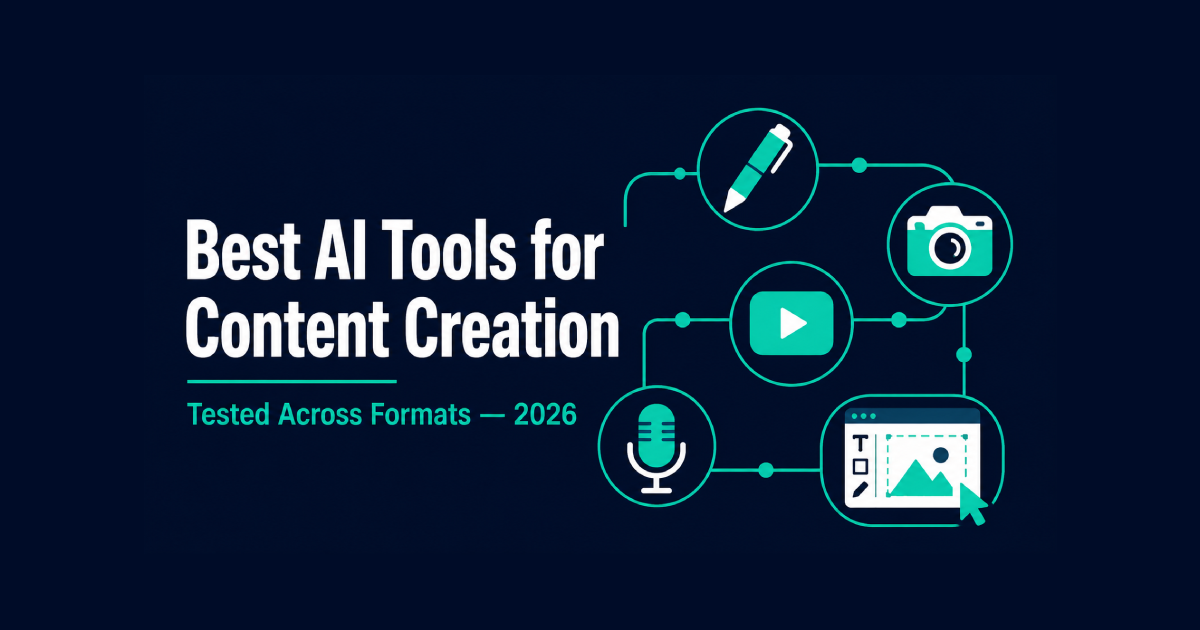
Best AI Tools for Content Creation in 2026 – Tested Across Formats
Table of Contents
A single piece of content rarely stays in one format anymore. A blog post becomes a LinkedIn carousel. A webinar becomes six short clips. A product description becomes a voiceover for an ad.
Most “best AI tools” lists treat content creation like it’s one task. It isn’t. Writing, design, video, and audio each need different tools, and the ones worth using in 2026 are the ones that fit into a real content strategy instead of creating more tab-switching than they save.
I tested seven tools across these formats with the same underlying question: does this tool generate something that fits straight into a content marketing workflow, or does it just generate something you still have to fix?
The Short Answer
Canva AI’s Magic Studio is the best all-in-one option for teams producing graphics, presentations, and short video from one editor. Koala AI is the best for niche and affiliate sites that need long-form content published straight to WordPress. Jasper is built for brand-governed content marketing at scale across teams.
Descript is the best way to edit video content by editing a transcript. Opus Clip is the best for turning long video into short, social media content automatically. ElevenLabs produces the most natural AI-generated voiceovers for narration.
What “Content Creation Tool” Actually Means in 2026
Two years ago this category meant text generators. That’s no longer accurate – most popular AI tools now blend formats or specialize in one stage of a larger content creation process.
The tools below either combine formats – text, image, video, and audio in one engine – or handle a specific production step well enough to earn its own subscription.
I’m not re-covering pure writing assistants like ChatGPT and Claude here; those get their own comparison in best free AI writing tools. I’m also not duplicating our AI video generator guide – the tools here handle production and repurposing, not generating footage from a prompt.
What I looked for: does the tool reduce actual production steps, does the output need heavy editing before it’s usable, and would a real content team running this every week actually keep paying for it.
Best AI Tools for Content Creation in 2026 – Full Breakdown
1. Canva AI (Magic Studio) – The Most Complete All-in-One Engine
Canva stopped being just a design tool a while ago. Magic Studio bundles design, basic video creation, and writing assistance into one workspace, and the integration between them is what makes it worth including here.
Magic Design generates layout options from a prompt. Magic Write drafts copy directly inside the design – no switching to a separate doc and pasting back in. Magic Switch takes one design and reformats it across a dozen aspect ratios automatically, solving a genuinely annoying repetitive task: resizing the same graphic for Instagram, LinkedIn, and a blog header.
What surprised me was Magic Edit, the generative AI feature for photo retouching. Select an object in an AI image, describe what you want changed, and it handles edits that used to require real Photoshop skill. For a small content team without a dedicated designer, that single feature closes a genuine skill gap.
The limitation is depth. Canva’s tools are broad rather than deep – Jasper writes longer-form copy more reliably, and dedicated video tools handle complex editing better. For quick, multi-format output without specialized skills, nothing else on this list covers this much ground in one engine.
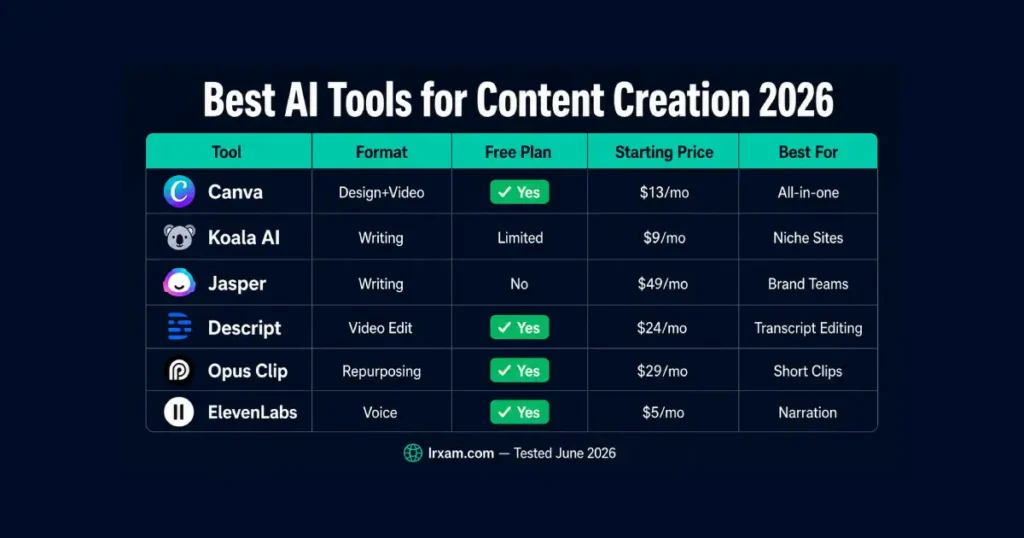
Free plan available. Pro at $13/month. Team pricing scales from there.
2. Koala AI – Best for Niche Sites and Affiliate Blog Content
Koala AI is built for a specific use case that general tools handle poorly: publishing SEO-structured blog content directly to WordPress at the pace a niche or affiliate site actually needs.
The Amazon product data integration is the standout feature for anyone running a review or comparison site. Pull in product details, pricing, and images directly into a draft instead of researching and typing them manually. For a site producing comparison posts on a regular content calendar, that removes a meaningful chunk of the research step.
One-click WordPress publishing matters here too. Most tools generate text you then have to format, add images to, and publish manually. Koala’s integration skips that cycle entirely – draft to live post in one action.
The writing is solid for structured, factual content but reads generically without a human pass. For “best X for Y” articles and buying guides, it’s efficient. For content meant to sound like a specific person wrote it, you’ll still want a human pass, matching the workflow we cover in how to use AI to write blog posts faster.
Plans start around $9/month for limited articles, scaling with volume.
3. Jasper – Best for Content Marketing at Scale
Jasper is an AI platform that has moved away from general-purpose writing and toward something closer to a governance system for marketing teams running multiple content strategies at once.
Feed it a brand style guide, product catalog, and messaging framework, and it generates content briefs, blog posts, social captions, and ad variations that stay consistent – without someone re-explaining brand voice in every prompt. For a team of five writers under one brand, that consistency is the actual value, not raw writing speed.
The Brand Voice feature analyzes existing content and learns tone patterns, which matters more as team size grows. A solo creator doesn’t need this. A content team where five different people write under one name absolutely does.
Pairing Jasper’s drafts with an SEO layer like the tools covered in best AI tools for SEO – Surfer SEO among them – rounds out the optimization step Jasper itself doesn’t handle.
Creator plan starts at $49/month. Team plans scale with seats and usage.
4. Descript – Editing Video Content by Editing the Transcript
Descript does something genuinely different: you edit video content by editing the text transcript. Delete a sentence in the transcript, and the matching video and audio clip deletes automatically. Filler words get flagged and removed with one click.
For anyone producing talking-head video, podcasts, or webinar recordings regularly, this changes how editing feels. Instead of scrubbing a timeline, you find the moment in the text and delete it like editing a document.
The Overdub feature generates a synthetic version of a recorded voice to fix a flubbed line without a re-record. It needs training on your own voice sample first, and the use case is narrow but genuinely useful when it applies.
As a tool for video specifically, this isn’t built for generating footage from nothing – that’s a different category. For editing existing recordings faster, it’s currently the most practical option I tested.
Free plan with watermark and limited transcription. Paid plans start at $24/month.
5. Opus Clip – Automated Long-to-Short Video Creation
Opus Clip solves one specific problem: turning a 45-minute webinar or podcast recording into multiple clips sized for TikTok, Reels, and Shorts – automatically.
Upload the long video, and it identifies segments likely to work as standalone social media content, adds captions, and reframes for vertical viewing. On a test webinar, it pulled four usable clips from 40 minutes of footage in about 8 minutes of processing. Doing that manually – watching, cutting, captioning, reformatting – takes hours.
The selection isn’t perfect. It favors moments with clear emotional emphasis, which works for interviews but less well for even-toned explainer content. Review what it picks rather than auto-publishing everything.
For repurposing long video regularly, which pairs directly with the workflows in AI tools for social media, this removes the most tedious part of that process.
Free tier with limited monthly minutes. Paid plans start at $29/month.
6. ElevenLabs – The Most Natural AI-Generated Voice
ElevenLabs generates voiceovers that, on a blind listen, are hard to distinguish from a human narrator. That claim gets made about a lot of voice engines. With ElevenLabs specifically, it holds up.
Voice cloning lets you train a synthetic version of a specific voice – useful for consistent narration across a series without booking a voice actor for every update. Multilingual support generates the same script in dozens of languages while preserving the original vocal tone, useful for teams localizing content at scale.
I tested it against three competing tools using the same 200-word script. ElevenLabs was the only one where I had to listen twice to confirm it wasn’t recorded. Pacing, breathing pauses, and inflection were noticeably more natural.
For explainer videos or ad voiceovers where hiring a narrator isn’t practical, this is the strongest option available right now.
Free tier with limited characters monthly. Paid plans start at $5/month, scaling for commercial use.
7. ChatGPT – The Practical Starting Point
ChatGPT isn’t specialized for any single format here, which is exactly why it earns a spot. Among AI tools like ChatGPT that try to cover everything at once, this is the one that actually does it adequately rather than poorly.
For a solo creator without budget for five subscriptions, it handles first-draft writing, basic AI image generation, video script brainstorming, and outlines for nearly any content type from one place.
It won’t out-perform Jasper on brand consistency, won’t beat Descript on video editing, won’t match ElevenLabs on voice quality. What it does is cover each task well enough that a creator just starting out doesn’t need to commit to five tools before knowing which ones they’ll actually use.
Free tier available. Plus at $20/month.
A Few More Worth Knowing
A handful of other tools come up often enough to mention briefly. Notion AI fits into a content calendar and team documentation workflow rather than generation itself – useful if your bottleneck is organization, not output.
Surfer SEO and similar tools aren’t content generators at all; they’re the optimization layer you run a draft through afterward, which is why we cover them separately in our SEO tools guide.
AI agents that can generate content, schedule it, and report back without a human triggering each step are starting to appear in essential ai tools for content production at the enterprise level, though most small teams don’t need that complexity yet.
And as multimodal AI models become standard – engines that handle text, image, and basic video understanding together – expect more tools on this list to blur the lines between categories rather than staying single-purpose.
How to Choose the Right Tools for Your Content Team
The honest answer: no single tool here replaces a full content creation process – each handles a different stage of one.
For written content, Koala AI or Jasper depending on whether you need WordPress publishing or brand governance across a content team. For multi-format graphics and quick video creation, Canva covers the most ground in one place.
For recorded video or audio, Descript for editing and Opus Clip for repurposing solve different parts of the same pipeline. For narration without hiring a voice actor, ElevenLabs.
A realistic starting stack for a small operation: one writing tool, Canva for visuals, and Opus Clip if repurposing matters. That’s three subscriptions covering most of a real content calendar, instead of chasing every new tool that gets recommended this month.
Budget shapes this more than people admit upfront. On a tight budget – under $40/month – Koala AI plus Canva’s free tier covers writing and basic visuals without much compromise. At $80-100/month, add ElevenLabs and Opus Clip’s paid tier, and video repurposing becomes part of the routine rather than a manual chore. Jasper only makes sense once a team, not a single person, is producing the content – its pricing reflects that positioning directly.
For the broader picture of how this fits into daily output beyond content specifically, best AI productivity tools covers the adjacent automation and scheduling layer.
Frequently Asked Questions
What are the best AI tools for content creation in 2026?
Canva AI’s Magic Studio is the best all-in-one option for design, presentations, and short video. Koala AI is the best for niche and affiliate sites publishing to WordPress. Jasper handles brand-governed content marketing at scale. Descript and Opus Clip cover video editing and repurposing. ElevenLabs leads on AI-generated voiceovers. The right pick depends on which format takes the most time in your workflow.
Is there a free AI content creation tool available in 2026?
Yes – several popular AI tools have usable free tiers. Canva’s free plan includes basic Magic Studio features. ChatGPT’s free tier handles writing, brainstorming, and basic image generation. Descript and Opus Clip both offer free tiers with limited monthly usage. ElevenLabs has a free tier with a limited character allowance. None are unlimited, but each is enough to test whether the tool fits before paying.
Can one AI tool handle every type of content creation?
Not effectively. Canva comes closest to covering multiple formats in one engine, but it doesn’t match specialized tools in depth for any single format. Most teams producing text, video, and audio regularly end up running 2-3 tools rather than one, each handling the part of the content creation process it’s actually built for.
How much do these AI content creation tools cost?
ElevenLabs starts at $5/month for light use. Koala AI starts around $9/month. Canva Pro is $13/month. Descript starts at $24/month. Opus Clip starts at $29/month. Jasper starts at $49/month, reflecting its focus on teams rather than individuals. A starting stack of 2-3 tools for a small content team typically runs $30-60/month total.
What’s the difference between Koala AI and Jasper?
Koala AI is built for SEO-structured blog content published directly to WordPress, with strong support for affiliate sites through its Amazon data integration. Jasper is built for marketing teams that need consistent brand voice across multiple writers and content types. Koala suits a solo site owner; Jasper suits a content team coordinating output across channels.
Is AI-generated content from these tools publish-ready without editing?
Generally not without a review pass. Koala AI and Jasper produce structurally sound drafts that still benefit from human editing for voice and specific detail. Opus Clip’s automatic clip selection needs review before publishing – it doesn’t always choose the strongest segments. ElevenLabs output is usually publish-ready as generated, since voice quality is the entire function rather than one step in a longer process.
Which AI tool should a beginner start with for content creation?
Start with ChatGPT — it covers every format adequately before you commit to multiple subscriptions. Once one format becomes the clear bottleneck – writing, video, or voice – switch to the specialized tool for that specific problem rather than adding tools speculatively.
Should a solo creator use the same tools as a content team?
Not necessarily. Tools like Jasper and its brand governance features solve a coordination problem that only exists once multiple writers produce content under one name. A solo creator gets little extra value from that layer and is better served by Koala AI, Canva, or ChatGPT – tools priced and built for individual output rather than team-wide consistency. The moment a second or third writer joins, revisiting Jasper or a similar platform starts to make more sense.