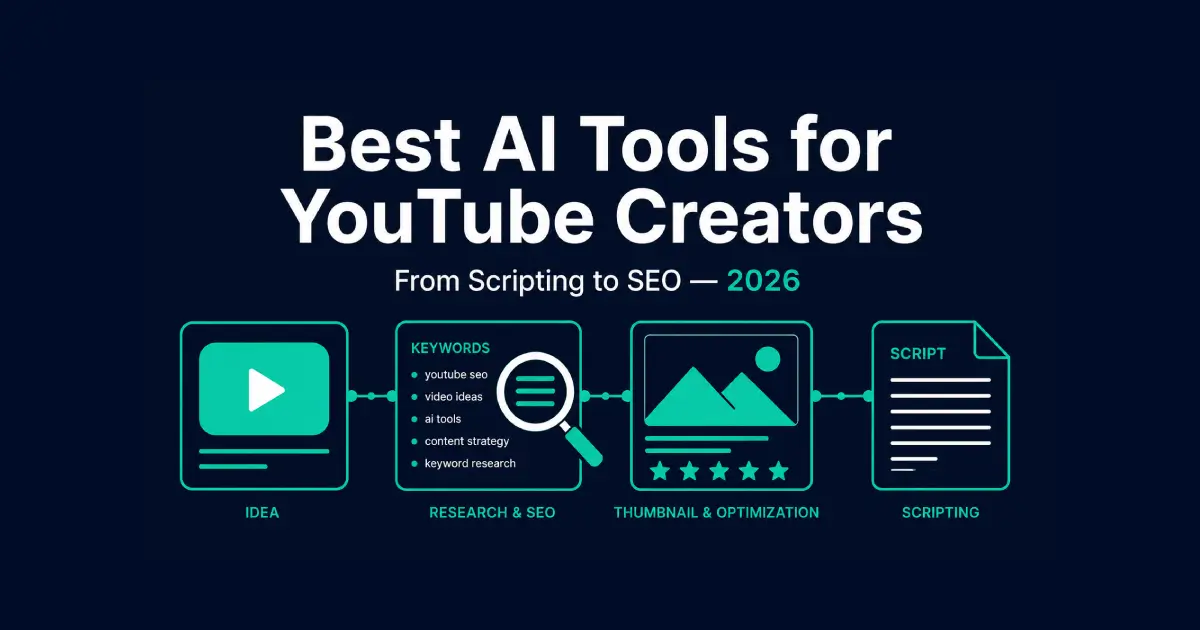
Best AI Tools for YouTube Creators in 2026 — From Scripting to SEO
Table of Contents
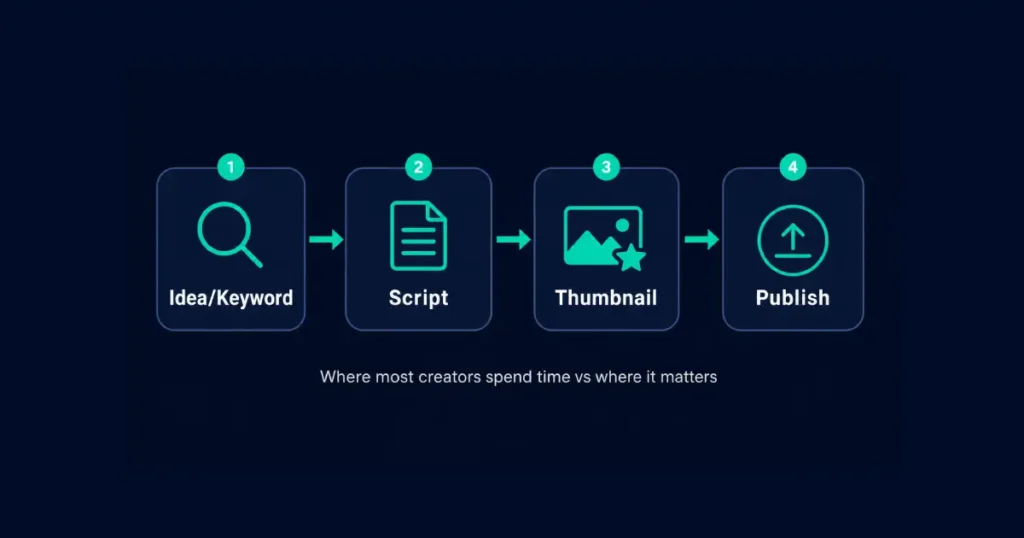
Eighty-three percent of creators now use some form of AI in their workflow. That number stopped surprising me a while ago. What still surprises me is how many YouTube creators use it on the wrong part of the process — polishing a script for hours while the thumbnail and title, which decide whether anyone clicks at all, get five minutes of attention.
These tools split cleanly into a few real jobs: writing and structuring scripts, designing thumbnails that actually get clicked, researching keywords that get found, and editing youtube video footage faster. I tested tools across all four categories on an active channel rather than a demo account, since free-trial numbers rarely match what happens with real upload history. Use AI on the wrong part of youtube content production and you end up with a polished script nobody finds.
The Short Answer
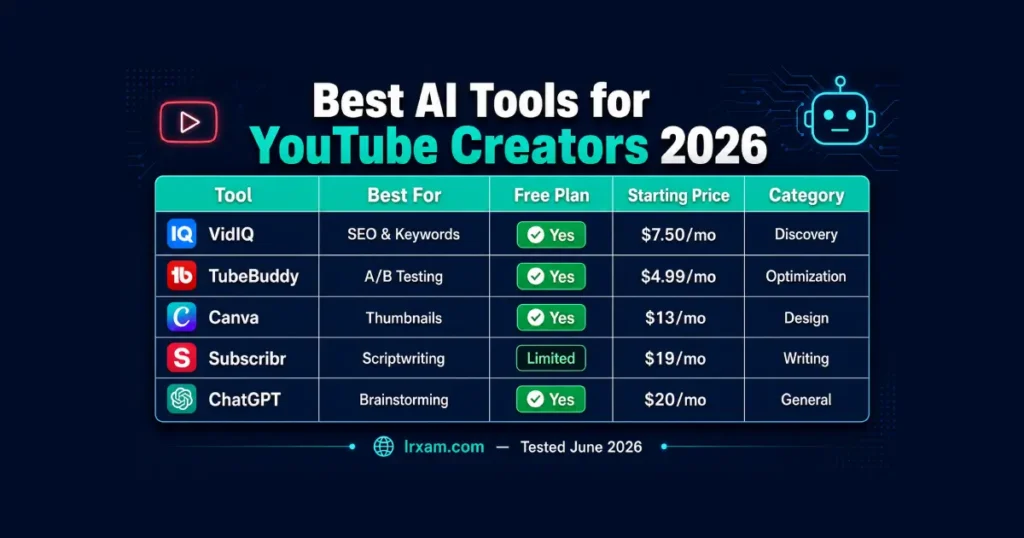
VidIQ is the best for keyword research and SEO data. TubeBuddy is the strongest for A/B testing thumbnails and managing an existing channel at scale. Canva remains the most reliable option for designing thumbnails without specialized skills. Subscribr is built specifically for YouTube scriptwriting rather than general writing. ChatGPT and Claude cover brainstorming and structure for content creators who don’t want a YouTube-specific tool yet.
What Actually Moves the Needle for a Channel
Production quality gets most of the attention in creator forums. Discoverability gets almost none, and that’s backwards.
A well-edited video nobody finds doesn’t grow a channel. A rough video with a strong title, a thumbnail that earns the click, and the right keywords in the description outperforms it every time. I’ve watched this play out across every small youtube channel I’ve followed growing over the past two years — production quality almost never decides who breaks through.
The tools below are organized around that priority. SEO and discoverability first, since that’s where creators consistently underinvest. Scripting and thumbnails next. Video editing and production tools get a brief mention with links to our dedicated coverage, since AI video generator tools already cover that ground in depth.
One more thing worth saying before the list: none of these tools fix youtube content that doesn’t have a clear reason to exist. AI can sharpen a title, predict a thumbnail’s likely performance, and structure a script faster than starting from a blank page. It can’t manufacture an angle that’s actually worth fifteen minutes of someone’s attention. That part is still entirely on the creator, and no amount of tooling changes it.
Best AI Tools for YouTube Creators — Full Breakdown
1. VidIQ — Best for Keyword Research and Channel Data
VidIQ is the tool I open before writing a single word of a script. The keyword research shows search volume, competition level, and related terms for any topic, which answers the question that actually matters before production starts: does anyone search for this.
The AI Title Predictor scores potential titles before publishing, based on patterns from videos that performed well in the same category. I ran five title variations through it for a recent upload and the scores correctly predicted which one ended up with the better click-through rate after a week of real youtube analytics data — not a perfect system, but directionally useful enough to change which title I picked.
Daily Ideas surfaces video topics and content ideas based on a channel’s niche and what’s trending in it right now. For a creator running out of ideas on a Tuesday, that one feature alone justifies checking the dashboard regularly. It’s one of the better research tools available for content planning specifically.
There’s no cost to start. Keyword research and a limited number of daily ideas are included free, and the full title predictor with deeper competitor tracking opens up once you move to Boost, which runs about $7.50 a month.
2. TubeBuddy — Best for Channel Management and A/B Testing
TubeBuddy and VidIQ solve overlapping problems, and the honest answer to “which one” is that it depends on what stage a channel is at. Plenty of established creators end up running tools like TubeBuddy and VidIQ side by side rather than choosing one.
TubeBuddy is stronger after upload. The thumbnail A/B testing rotates two versions of a thumbnail across viewers and reports which one earns more clicks — genuinely useful data for YouTube creators instead of a guess based on personal preference. Bulk processing for tags and end screens matters once a channel has fifty or more videos that need consistent metadata, which becomes a real chore to manage manually at that scale without automation tools.
For a channel just starting out, VidIQ’s keyword research is probably the higher priority. For an established channel optimizing existing youtube content, TubeBuddy’s editing tools for tags and testing earn their place first.
- There’s a free plan, and the core optimization features run about $4.99 a month once you upgrade.
3. Canva — Still the Most Reliable Thumbnail Tool
A handful of new tools market themselves as YouTube-specific thumbnail generators, promising better click-through rates through built-in algorithm knowledge. I tested three of them. None had a verifiable track record beyond their own marketing claims, which is a pattern worth being skeptical of in this specific corner of the AI tools market — search results for this exact category are full of tools reviewing themselves favorably on their own blogs.
Canva doesn’t claim algorithm-specific intelligence, and that honesty is part of why it’s still the dependable choice. Magic Design generates layout options sized correctly for YouTube thumbnails. The AI image background removal and Magic Edit tools handle the retouching that used to require real design skill — powerful ai capability that used to need an actual designer. We cover Canva’s broader content creation tools elsewhere, but the thumbnail-specific templates are what matter here.
What Canva won’t do is tell you whether a thumbnail will perform well in your specific niche — that judgment still comes from watching your own analytics and from TubeBuddy’s A/B data once you have enough traffic to test.
The free version is enough for most individual creators. Pro runs $13 a month, and there’s separate team pricing once multiple editors are working on thumbnails together.
4. Subscribr — Scriptwriting Built for YouTube Specifically
Subscribr is different from general writing assistants in one specific way: it’s trained on what makes YouTube video scripts work as spoken content, not written content.
Hooks, pacing for retention, and structure that accounts for where viewers typically drop off are built into how it generates a draft for YouTube creators, rather than something you have to prompt for separately. For a creator who scripts every video, that YouTube-specific training shows up in fewer rounds of rewriting compared to a general ai assistant.
It won’t replace your voice. Scripts still need a personal pass before recording — the same caution that applies to any ai-generated content. What Subscribr does well is get the structural first draft closer to usable than a general prompt to ChatGPT typically produces, which matters if content strategy depends on consistent weekly output.
Pricing starts around $19/month after a limited free trial, which is enough time to test it on two or three real uploads.
5. ChatGPT and Claude — For Creators Who Don’t Need a Specialized Tool Yet
ChatGPT and Claude handle brainstorming, outline structure, and a first-draft script adequately without committing to a YouTube-specific subscription. Multiple AI tools can technically do this job, but these two remain the most reliable starting point.
For a new channel still figuring out format and niche, this is the right starting point. Subscribr’s YouTube-specific training becomes worth paying for once scripting volume and consistency matter more than flexibility. Until then, a general writing tool with good prompts covers most of what a script needs — these tools help creators get a usable draft without committing to anything specialized yet.
The prompt matters more than the tool here. Ask for a script and you’ll get generic structure. Ask for a hook that creates a specific curiosity gap, a script that front-loads the payoff before explaining how you got there, and you’ll get something closer to what actually keeps people watching. Creators who want consistently better results learn to write better prompts before they reach for a better tool.
Both have free tiers that work fine for this. If you end up using either daily, the $20-a-month paid plans get you longer context and faster responses.
6. YouTube Studio’s Built-In AI Capabilities
Easy to overlook because it’s not a separate subscription: YouTube itself has been rolling out AI tools directly inside Creator Studio, transforming YouTube’s native upload flow in the process. Auto-dubbing translates a video into multiple languages using a synthetic AI voice cloned from the creator’s own, expanding reach to non-English and educational content audiences without hiring translators or voice actors.
AI-suggested thumbnails and title variations now appear directly in the upload flow for some channels, pulling from the same kind of performance data that VidIQ and TubeBuddy track separately. Content gap suggestions surface topics other channels in a similar space are covering successfully — useful for creators looking to scale into adjacent niches.
None of these capabilities are as deep as a dedicated tool yet, but they’re free, already inside the platform every creator uses, and worth checking before adding another subscription for something Studio might already handle adequately.
A Few More Worth Knowing
For video editing and repurposing — turning a long upload into Shorts, removing filler words by editing a transcript, or generating ai voiceovers in a cloned voice — tools like Descript, Opus Clip, and ElevenLabs do that work well. Repurposing long-form content into short clips automatically is exactly the kind of repetitive task AI handles better than a human editor working frame by frame. We cover all three in detail in our AI tools for content creation guide rather than repeating the same reviews here.
For creators producing video as part of a broader content calendar across platforms, our AI tools for social media guide covers how professional YouTube content fits alongside Instagram, TikTok, and other channels in one workflow.
Common Mistakes Creators Make With These Tools
I see the same script problem constantly: someone publishes an AI draft word for word. It reads fine on a page and falls flat on camera, because spoken delivery and written structure aren’t the same thing. Run any script out loud before recording — sections that look fine in text often need restructuring once you hear them.
Keyword data gets misused too, just differently. VidIQ and TubeBuddy show what’s searched and what’s competitive, but a video built entirely around keyword volume with no genuine angle tends to underperform anyway. The data narrows the options. It doesn’t replace having something worth saying in the first place — no tool fixes that for you.
And then there’s the rush to pay before testing. Every tool covered here has a free option worth running for at least two weeks of real uploads — skipping straight to a paid plan tells YouTube creators nothing about whether the tool actually fits how they work. Tools offer free trials for a reason; use them before you commit.
How to Choose the Right Tools for Your Channel
Start with the bottleneck, not the full list. If videos exist but nobody finds them, VidIQ or TubeBuddy comes first — discoverability problems get worse the longer they’re ignored, since the algorithm has less data to work with on videos nobody clicks. If scripts take hours and still feel disorganized, Subscribr or a well-prompted ChatGPT session solves that specific problem.
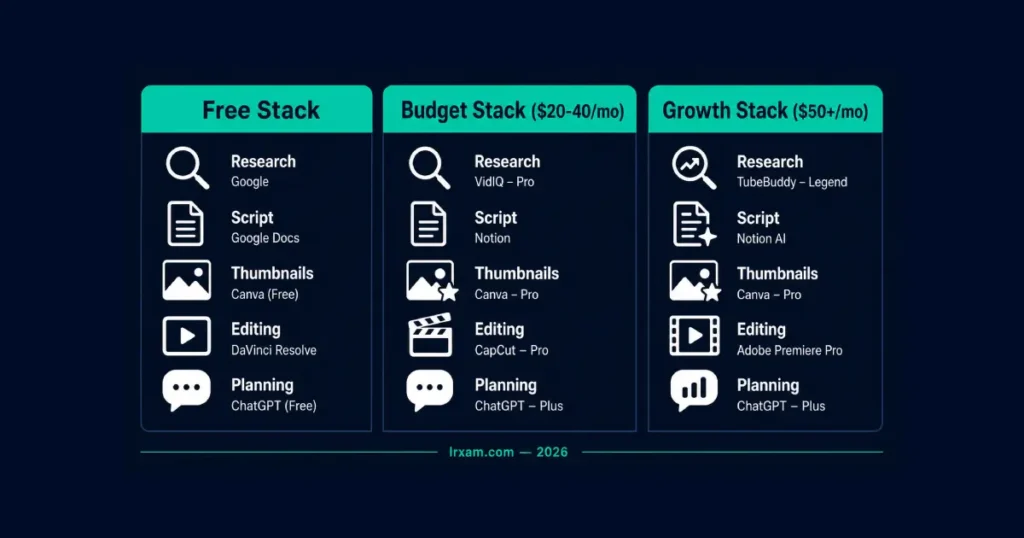
A practical starting stack for a smaller channel: one SEO tool (VidIQ’s free tier is genuinely usable to start), Canva for thumbnails, and ChatGPT for scripting. That covers the core workflow most YouTube creators need for close to nothing in monthly cost. Add Subscribr once script quality becomes the clear limiting factor, and TubeBuddy’s testing tools once there’s enough upload history and traffic for A/B data to mean anything.
Skip the specialized tool that promises to handle the entire channel from one dashboard. Every creator I’ve talked to who tried an all-in-one platform ended up using two or three separate tools alongside it within a few months anyway, once the limits of the generalist tool became obvious for their specific niche. Best tools tend to do one job well rather than five jobs adequately.
Content format changes the calculation too. A talking-head channel gets more value from scripting tools, since the words carry most of the video. A heavily edited, B-roll-driven channel gets more value from the video editing and repurposing tools covered in our content creation guide, since the script is a smaller part of what makes the video work. Match the tool investment to where your actual ai workflow spends its time.
Frequently Asked Questions
What are the best AI tools for YouTube creators in 2026?
VidIQ and TubeBuddy lead on SEO, keyword research, and channel analytics. Canva remains the most reliable thumbnail tool. Subscribr is built specifically for YouTube scriptwriting. ChatGPT and Claude cover general scripting and brainstorming for creators not ready to commit to anything YouTube-specific. The right combination depends on which part of the workflow — discoverability, scripting, or design — is the actual bottleneck.
Is VidIQ or TubeBuddy better for YouTube?
VidIQ is better for new channels building discoverability; TubeBuddy is better for established channels needing A/B testing. VidIQ has stronger keyword research and is generally the better starting point for a newer channel trying to find what to make. TubeBuddy is stronger for A/B testing and managing an established channel with existing upload history. Both have usable free plans — testing both on a real channel for a couple of weeks is the most reliable way to decide which interface fits better.
Can AI write a full YouTube script?
Yes, but publishing it without a personal pass is a mistake. Subscribr and general tools like ChatGPT produce solid structural drafts — hooks, pacing, section breaks — but the specific examples, personality, and voice that make a creator’s channel distinct still need to come from the creator. Treat ai-generated content as a strong first draft, not a final one.
Are AI-generated YouTube thumbnails actually better than manual ones?
Neither is automatically better — thumbnail quality depends on design execution, not the tool used. A well-designed manual thumbnail with strong contrast and a clear focal point outperforms a poorly prompted AI image, and the reverse is also true. Tools like Canva speed up the design process; they don’t replace understanding what makes a thumbnail earn a click in your specific niche.
How much do AI tools for YouTube creators cost in 2026?
VidIQ and TubeBuddy both have free tiers, with paid plans starting around $5-7.50/month. Canva Pro is $13/month. Subscribr starts around $19/month after its trial. ChatGPT and Claude are $20/month each on their paid tiers, with usable free versions available. A realistic starting stack covering SEO, thumbnails, and scripting runs $0-20/month depending on which free tiers a creator is comfortable working within initially.
Should a new YouTube channel invest in AI tools immediately?
Not all of them. A brand-new channel benefits most from free tools — VidIQ’s free keyword research, Canva’s free thumbnail templates, ChatGPT’s free tier for scripting. Paid tools become worth the cost once a channel has enough upload history and traffic for the data-driven features, like A/B testing or detailed competitor tracking, to actually have something to analyze.
Do YouTube’s own built-in AI features make third-party tools unnecessary?
Not yet, but they’re worth checking first. YouTube Studio’s native capabilities — auto-dubbing, AI-suggested thumbnails and titles in the upload flow, content gap suggestions — are free and improving steadily. For a creator just starting out, checking what Studio already offers before paying for a third-party tool that does something similar is a reasonable first step.
How many AI tools does a YouTube channel actually need?
Most growing channels settle on four to six tools across the core categories: one for SEO and keyword research, one for thumbnails, one for scripting, and one or two for video editing and repurposing if the channel posts Shorts or repurposes long-form content. Adding tools beyond that rarely solves a real problem — it usually just adds subscriptions and another login to manage. Start with the bottleneck that’s actually slowing the channel down, and add the next tool only once that one is solved.