Best AI Video Generator Tools in 2026 — Tested and Compared
Table of Contents
Six months ago I ran the same prompt through twelve different platforms to compare their ai video generation capabilities. A simple scene: a woman walking through a rainy street at night, neon signs reflecting in puddles.
The results ranged from genuinely cinematic to embarrassingly broken. Two tools produced footage I’d use in real project. Three produced something passable with heavy prompting. The rest gave me melting faces, broken physics, and characters that changed appearance between frames.
Here’s what actually works — and what the gap between free and paid looks like in 2026.
How I Tested
Every tool got the same three prompts:
Prompt 1 — Cinematic scene: A woman walking through a rain-soaked street at night, neon signs reflecting in puddles. Camera follows from behind.
Prompt 2 — Character dialogue: A man sitting at a coffee shop table, speaking directly to camera. Natural lighting. 15 seconds.
Prompt 3 — Product video: a great opportunity for ai video generation. A perfume bottle rotating slowly on a white surface. Studio lighting. No people.
I scored each on motion stability, character consistency, prompt accuracy, and generation speed. Same settings, same account tier, same prompt across every platform.
The Short Answer
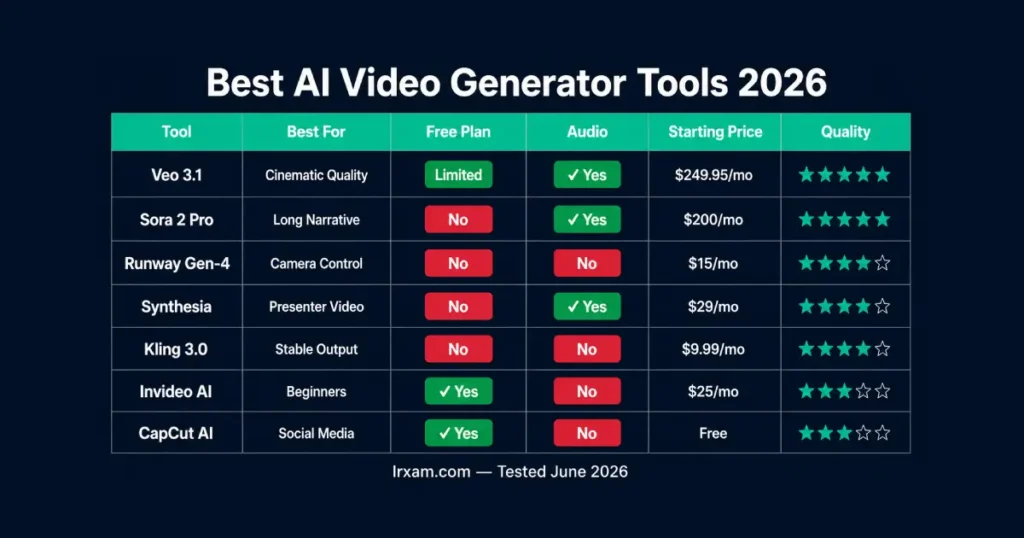
Veo 3.1 by Google produces the most realistic footage available in 2026, with native audio that actually matches what’s on screen. Sora 2 Pro handles long-form narrative better than anything else I tested. Runway Gen-4 gives the most control over camera movement and character consistency. Synthesia is the best for talking-head presenter videos. Kling AI is the most stable mid-range option. Invideo AI is the easiest starting point for beginners who want fast results without a learning curve.
Best AI Video Generator Tools in 2026 — Full Breakdown
1. Veo 3.1 — The Most Realistic AI Video Model Available
Google’s Veo 3.1 is the best option on raw output quality. The gap between what it produces and what the next-best video model makes is meaningful.
On the rainy street prompt, the physics were right. Rain hit the puddles and splashed the way rain actually does. The neon reflections moved correctly as the character walked. The camera follow felt like a real operator made deliberate choices about framing — not like a video generation algorithm approximating what “camera follow” means.
The native audio is the other differentiator. Most tools produce silent clips you then layer audio onto separately. Veo generates synchronized sound — ambient rain, footsteps on wet pavement, distant traffic — directly from the prompt. For the dialogue scene, it produced café ambient noise and synced it to mouth movement without additional input. That’s a genuine step beyond what other generative video platforms offer.
The access situation is the honest downside. It isn’t available as a simple standalone subscription. You access it through Google’s AI Ultra plan ($249.95/month), through Gemini, or through partner platforms like Synthesia’s creative tools for ai video generation. For professional video production work, the quality justifies that. For occasional social content, the pricing structure is impractical.
2. Sora 2 Pro — Best for Long-Form Video Production
Sora 2 Pro The ai video generation from OpenAI handles what most ai video tools fail at: consistency across extended clips. Most platforms produce decent 4-6 second clips that fall apart beyond that. Sora 2 maintains character appearance, physics coherence, and scene continuity across much longer sequences.
On the dialogue test, Sora 2 Pro was the only tool besides Veo that kept the character’s face consistent from start to finish. Character drift — where a person’s face gradually shifts appearance over 15-20 seconds — is the most common failure in video generation right now, and most platforms haven’t solved it. Sora has.
The world simulation is the other strength. Complex scenes with multiple moving elements — people in the background, light changes, objects interacting — stay physically coherent in ways competitors don’t match. For traditional video storytelling with narrative arcs and scene continuity, this is currently the best option available.
Access requires a ChatGPT Pro subscription at $200/month. Not cheap. Justified for professional narrative work; harder to justify for short-form social content.
3. Runway Gen-4 — Best for Camera Control and Character Consistency
If Veo and Sora lead on quality, Runway Gen-4 This platform leads on control for ai avatar customization. It’s the choice for people who know exactly what they want and need the tool to execute specific creative decisions rather than interpret vague prompts.
Camera motion control in Gen-4 is precise, enhancing the overall video quality. Dolly moves, orbit angles, focal length, depth of field — specifying these produces predictable, consistent output. On the product video test, I could define the exact rotation speed and lighting angle and get something close to what I described. Other tools guessed.
The character consistency features let you lock a face or body type across multiple generations, which is the practical requirement for anything beyond a single clip. If you’re producing a series of shorts, an ad campaign, or any content where the same character appears in multiple videos, Runway is currently the most practical tool for that workflow.
Standard plan at $15/month for 625 credits. Pro at $35/month. Enterprise for high-volume video production.
4. Synthesia — Best for Presenter and Corporate Video
Synthesia solves a specific problem that generative tools don’t: professional-looking presenter content without filming anyone.
Type a script. Choose an avatar from 230+ options. Synthesia produces the professional video with the avatar delivering the script in a natural voice, with lip-sync that holds up to close inspection. The output is polished enough for corporate training, product demos, and explainer content.
This is a different type of video than what Runway or Veo produce, especially in terms of video quality. Those are generative ai tools that create footage from scratch. Synthesia is an avatar platform. The two categories serve completely different purposes — the comparison is misleading — Synthesia isn’t trying to make cinematic footage, and generative tools aren’t trying to make professional presenter videos.
For internal training content, onboarding videos, or product walkthroughs — Synthesia is faster and cheaper than filming. The limitation is that it looks like what it is. For content where authenticity matters to the audience, that’s a real consideration.
Starter at $29/month. Creator at $89/month.
5. Kling AI — The Production-Ready Mid-Range Option
Kling AI from Kuaishou is the most reliable video editor and generator I tested outside the top-tier options. The motion physics stand out. Characters walk like humans walk. Cloth moves. Hair responds to implied wind. These sound like basic requirements — most tools still get them wrong.
The platform also handles stylized and experimental prompts better than platforms that interpret prompts too literally. For content that needs a distinctive visual style rather than photorealism, it produces more interesting output than the alternatives at similar pricing.
Advanced features include camera control and character consistency tools that approach Runway’s capabilities at a lower price point. Generation speed was consistently strong across my testing — faster than Runway at the same quality tier.
Plans from $9.99/month. Worth checking current pricing as it adjusts regularly.
6. Invideo AI — For Beginners Who Need Results Fast
Invideo AI The current setup isn’t producing that quality of footage needed for a top ai video. That’s not what it’s for in the context of video projects.
What Invideo does well is remove friction from the entire process. Describe what you want in plain language — a product explainer video, a social ad, a YouTube intro — and the platform handles scripting, scene selection, voiceover, and basic video editing in a structured workflow. The output is polished enough for social media, marketing content, and internal presentations without requiring any technical prompting knowledge.
For someone who needs to generate video content regularly but doesn’t want to learn prompt engineering or manage complex generation settings, Invideo is the practical choice. The quality ceiling is lower than generative tools, but the time from idea to finished video clip is shorter. That trade-off makes real sense for specific workflows.
Free plan available with watermark for ai video generation. Paid plans from $25/month.
7. CapCut — Best Free AI Video Tool
CapCut‘s AI video capabilities improved significantly in early 2026. The free tier generates 1080p output, the AI editing tools handle the most common social video tasks well, and the mobile workflow is smoother than any other tool I tested.
For short-form social content — Reels, TikTok, Shorts — CapCut’s AI features handle the most common workflows without a subscription. Auto-captions work well, the AI B-roll suggestions save sourcing time, and the template-based video creation produces usable output quickly.
CapCut is optimized for AI-powered video editing and enhancement of existing footage rather than generating video from text prompts from scratch. The distinction matters — it’s a video editor with strong AI assistance, not a text-to-video generator. For what it does, it’s the best free option available.
Free tier with watermark on some exports. Pro at $9.99/month.
How to Choose the Right AI Video Generator for Your Work
The decision comes down to what you’re actually making and what level of creative control you need.
Cinematic footage from a text prompt: Veo 3.1 if you can access it’s platform, Runway Gen-4 if you need precise camera control, Kling AI if you want reliable mid-range output with advanced AI capabilities.
Long-form narrative with consistent characters: Sora 2 Pro. The character consistency across longer clips is the differentiating feature.
Professional presenter or corporate video: Synthesia. Nothing else on this list is built for this and the quality gap shows.
Social media content, fast workflow: Invideo for complete beginners, CapCut if you’re enhancing and editing existing footage with AI tools.
Budget: CapCut’s free tier covers basic social content. Kling at under $10/month delivers genuine generative capability. Runway at $15/month provides professional camera control. Sora 2 Pro and Veo 3.1 are for serious video production work at serious prices.
Understanding the difference between a video model and a video platform matters here. The models are the engines — Veo, Sora, Kling AI generate the actual footage. The platforms are where you run them — sometimes one company makes both, sometimes platforms aggregate multiple models for enhanced video quality. Runway runs its own models with strong camera control tools. Invideo AI uses AI models to power a complete video creation workflow. Knowing which layer you’re choosing affects what you can actually do.
For creators building a complete content workflow, see how these tools fit into a broader AI tools for social media content creation This strategy is essential for ensuring high video quality. And if you’re using video as part of a larger content operation, the AI productivity tools guide covers how to build efficient production pipelines across text, image, and video.
Frequently Asked Questions
What is the best AI video generator in 2026?
Veo 3.1 produces the highest quality ai-generated video currently available, with realistic physics, consistent characters, and native audio generation from text prompts. For production control and character consistency across multiple clips, Runway Gen-4 is the professional choice. For presenter video, Synthesia leads the category. The right tool for your video project depends entirely on what type of video you’re making.
Which AI video tools are free in 2026?
CapCut offers genuine free AI video editing and generation with 1080p output. Invideo AI has a free tier with watermark. Most generative tools — Runway, Kling AI, Sora, Veo — require paid subscriptions for meaningful generation. Free tiers on these platforms exist mostly for testing rather than serious video production work.
How much does an AI video generator cost in 2026?
Costs range from free (CapCut) to /month (Sora 2 Pro), with most tools at -30/month. CapCut is free for basic use. Kling AI starts around $9.99/month. Runway Gen-4 starts at $15/month. Invideo AI plans start at $25/month, with options for a free trial. Synthesia starts at $29/month. Sora 2 Pro requires ChatGPT Pro at $200/month. It’s accessible through Google’s AI Ultra at $249.95/month. For most social video content, Kling or Runway at the lower price points cover most workflows.
What is the difference between AI video generators and avatar tools like Synthesia?
AI video generators like Runway, Veo, and Kling AI create cinematic ai video from text prompts — they generate footage from scratch based on descriptions. Avatar tools like Synthesia use pre-built digital avatars to deliver scripts on screen. The two serve completely different purposes: generative tools for creative and cinematic video, avatar tools for professional presenter or training videos. They’re not competing for the same use case in the realm of ai video generation.
Can AI tools generate video with audio in 2026?
Some can. Veo generates synchronized audio — ambient sound, dialogue, music — directly from the text prompt. Sora 2 Pro also has native audio capabilities. Most other video generation tools still produce silent clips that require separate audio production. Native audio generation is one of the meaningful differentiating features between top-tier and mid-range platforms in 2026.
Is AI-generated video good enough for professional use in 2026?
For corporate training and social media yes; for broadcast or advertising, not consistently enough yet. For corporate training content, internal presentations, and social media, the quality is adequate for most purposes. For broadcast, film, or advertising with high audience expectations, AI video is getting closer but isn’t consistently reliable enough without significant human review. Veo, Sora 2 Pro, and Runway Gen-4 come closest to professional-grade output.
How long does it take to generate an AI video in 2026?
Expect 2-5 minutes on free plans and 30-90 seconds on paid tiers, depending on the platform. On free or basic plans, expect 2-5 minutes per clip. On paid professional plans, the same generation typically takes 30-90 seconds. Kling was the fastest in my testing on the professional tier. Veo 3.1 took longer but consistently produced the best output quality.