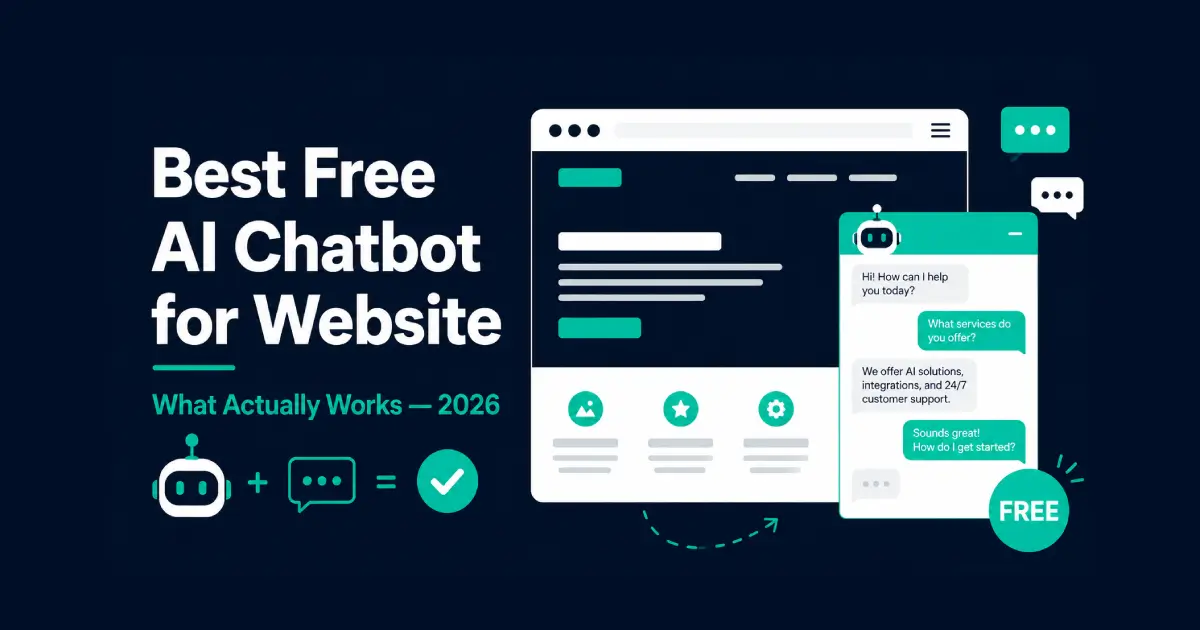
Best Free AI Chatbot for Website in 2026 – What Actually Works
Table of Contents
Last month I spent three days adding chatbots to test websites. Six different tools. Same scenario each time: a small online store with a FAQ page and a product catalog.
Some of the “free” options weren’t free. Some required a credit card to start. One gave me 14 days before cutting everything off. Two were genuinely free long-term without paying anything.
Here’s what I found after testing every free AI chatbot for website use I could find in 2026.
How I Tested
Every tool was tested on the same three tasks:
Task 1 – FAQ handling. I uploaded the same 15 questions to each bot and asked variations of those questions. I scored how accurately the chatbot responded.
Task 2 – Setup time. How long from signup to a working chatbot on a website. Under an hour was my threshold for the free tier.
Task 3 – Free tier limits. What the free plan actually gives you, what happens when you hit the ceiling, and whether this is genuinely free or just a trial with a timer on it is crucial for evaluating AI tools.
I didn’t test tools with no free plan at all. Everything here is available for free – no credit card required to start.
The Short Answer
The best free AI chatbot for website use in 2026 is Tidio. The free plan is real, setup takes under 30 minutes, and the built-in AI bot handles common customer questions well. HubSpot’s chatbot builder is the best free option if you also need a CRM. Chatbase gives the best AI accuracy on your own content.
None of these are unlimited. All of them hit a ceiling eventually. I’ll be specific about exactly where.
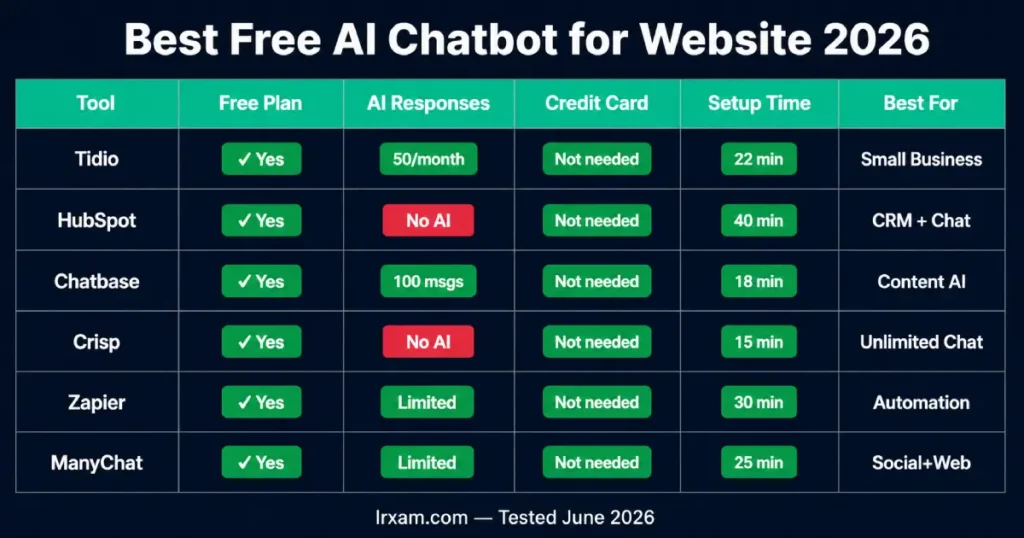
Best Free AI Chatbot for Website in 2026 – Full Breakdown
1. Tidio – Best Free AI Chatbot for Website and Small Business
Setup time: 22 minutes from signup to a working chatbot on a test site.
Tidio has the most complete free offering among the website chatbots I tested. The free tier includes a live chat widget, basic rule-based bot flows, and 50 Lyro AI conversations per month. Lyro is their conversational AI layer – it reads your FAQ or website content and answers questions based on what it finds there.
On the FAQ test, Lyro answered 13 of 15 questions accurately. The two it got wrong were edge cases that required combining information from two different parts of the FAQ. That’s a strong result. Most ai chatbot platforms I tested scored lower.
The 50 conversation limit sounds restrictive. For a small business getting started, 50 automated conversations per month is enough to see whether a free AI chatbot for website works for your use case before committing money to it. When you hit the limit, conversations revert to regular live chat – they don’t disappear.
The Shopify integration pulled in product information and order status automatically. I asked the test bot about a specific product SKU and it returned the right price and availability without any manual setup.
Where it gets complicated: Lyro’s free tier resets monthly but conversations don’t roll over. On busy months you hit the ceiling fast. The next plan up is $29/month.
Free tier: Live chat, 50 Lyro AI conversations/month, 3 bot flows, Shopify and WooCommerce integration. No credit card required.
2. HubSpot Chatbot Builder – Best Free Bot With CRM
HubSpot’s chatbot builder is completely free as part of their CRM tier. The bot connects to contact records automatically, so every conversation becomes part of a customer’s history.
For businesses that track leads – even informally – this integration is the main reason to choose HubSpot over other free AI chatbot for website options. A visitor chats about pricing, becomes a contact, and the sales team can see that conversation when they follow up. That context would otherwise be lost.
The chatbot builder itself is drag-and-drop. You build bot flows visually. The limitation: HubSpot’s free chatbot is rule-based, not agentic AI. It follows the flows you build, and when a question falls outside those flows, the bot doesn’t know what to do. On my FAQ test, it handled 9 of 15 questions correctly – only the ones that mapped directly to the flows I’d built.
That’s acceptable for a scripted bot, but it means you need thorough flows rather than relying on an AI assistant to handle the gaps.
Free tier: Unlimited bot flows, live chat widget, CRM contact creation, meeting booking. No AI responses – rule-based flows only.
3. Chatbase – Best AI Accuracy on Your Own Content
Chatbase Tidio takes a different approach to building a free AI chatbot for website use, positioning itself among the best AI chatbots available. Instead of building flows, you upload your content – PDFs, URLs, FAQs – and it builds an AI chatbot trained on that information. Questions get answered based on your actual content rather than predefined bot paths.
The free tier gives you one chatbot with 100 message credits per month. That’s genuinely limited – at 20 conversations that’s 5 interactions before you hit the wall. For testing, enough. For a live website with real traffic, you’ll need to upgrade to access the full potential of the best AI chatbots.
What Chatbase does better than other free ai chatbots in 2026: content accuracy. On my FAQ test, it scored 14 of 15 – the best result of any tool I tested. It found the right answer in uploaded documents even when the question was phrased differently from the FAQ text.
Setup took 18 minutes – the fastest in my testing.
Paid plans start at $19/month, jumping from 100 to 2,000 messages per month.
Free tier: 1 chatbot, 100 message credits/month, website embedding, PDF and URL training.
4. Crisp – Genuinely Free Live Chat With Basic Bot
Crisp is primarily a live chat platform. The free plan is genuinely unlimited on the live chat side – no conversation caps, no credit card, no expiry, making it one of the best free AI chatbots available. The basic bot handles simple automated responses.
The AI capabilities on the free tier are minimal – closer to a rule-based bot than a conversational AI that understands questions. Advanced AI features require the Pro plan at $25/month.
I’m including it because the free live chat is valuable on its own. Many small businesses discover they don’t need AI for their first chatbot. Start with Crisp free, see if you need AI, upgrade if you do. For businesses where conversation volume is the priority, Crisp’s completely free live chat handles the most volume of any tool here.
Free tier: Unlimited live chat conversations, 2 agents, basic bot triggers. No AI responses.
5. Zapier Chatbots – Best Free Bot for Workflow Actions
Zapier Chatbots This AI tool lets you build a chatbot that triggers automations, enhancing the functionality of your website. A visitor asks about order status, the bot queries your system, returns the answer. No code required if you already use Zapier.
What separates this from other free ai chatbots: agentic AI capability. Most website chatbots, including the best AI chatbots, answer questions effectively. Zapier’s bot can take actions – book appointments, update records, send emails, trigger any Zapier workflow. For use cases where chatbot conversations should lead to system actions, this is the most capable free tool I tested.
The AI conversation quality on the FAQ test was average – 11 of 15 correct. For straightforward Q&A, Chatbase or Tidio are more accurate.
Free tier: 2 chatbots, basic knowledge sources, website embedding.
6. ManyChat – Best for Social + Website Combined
ManyChat is built for Instagram and Facebook Messenger, but includes a website widget. The free plan covers Instagram and Facebook with a limited number of active contacts.
For businesses where customers primarily reach out through social media, ManyChat handles both channels from one free tool. The website bot forwards to the same flows you’ve built for social.
Note: the free plan’s active contact limits changed in early 2026. Verify current limits at manychat.com before signing up.
Free tier: Instagram and Facebook bot automation, basic website widget. Contact limits apply, which can affect your experience with the best free AI chatbots.
How to Choose the Right Free AI Chatbot for Your Website
Two questions decide it: what do you need the chatbot to do, and how much setup time can you spend?
| Situation | Best free AI chatbot for website |
|---|---|
| Most small business websites | Tidio |
| Need CRM alongside chatbot | HubSpot |
| Best AI accuracy on your content | Chatbase |
| Unlimited conversations without AI | Crisp |
| Chatbot that takes workflow actions | Zapier Chatbots |
| Multi-channel social + website | ManyChat |
One thing worth saying clearly: every free AI chatbot for website use in 2026 is a starting point, not a finished product. Every free tier has limits that matter eventually. The useful question isn’t “can I run this completely free forever” – it’s “can I learn enough on the free tier to know whether this is worth paying for.” All six tools above answer that adequately.
Choosing the right AI chatbot comes down to what your visitors actually ask, especially when considering the best AI chatbots on the market. If they ask open-ended questions, you need conversational AI – Tidio or Chatbase. If they follow predictable paths, a rule-based bot like HubSpot or Crisp covers it without paying anything.
Frequently Asked Questions
What is the best free AI chatbot for a website in 2026?
Tidio is the best free AI chatbot for website use for most small businesses. The free tier includes 50 AI-powered conversations per month, real e-commerce integrations, and takes under 30 minutes to set up. For businesses needing CRM integration, HubSpot’s free combination is the strongest no-cost option among the best AI chatbots available. For best AI accuracy on your own content, Chatbase performs better but has a tighter message limit.
Can I get a free AI chatbot for my website without a credit card?
Yes. Tidio, HubSpot, Chatbase, Crisp, and Zapier Chatbots are all available for free without a credit card. ManyChat also has a free tier, though active contact limits changed in early 2026. These are genuinely free ai chatbots – not 30-day free trials.
How many conversations can I handle on a free chatbot?
Crisp is unlimited (no AI); Tidio gives 50 AI chats/month; Chatbase gives 100 messages/month. Crisp offers unlimited live chat conversations completely free, but without AI. Tidio gives 50 Lyro AI conversations per month. Chatbase gives 100 messages per month total. HubSpot gives unlimited bot flows but no AI responses. Zapier gives a limited number of interactions per month.
How long does it take to set up a free AI chatbot on a website?
Between 18 and 45 minutes for the tools I tested. Chatbase was fastest at 18 minutes. HubSpot took the longest at around 40 minutes due to CRM setup. None required coding – all used drag-and-drop builders or simple URL uploads to train the AI.
Do free AI chatbots work on WordPress?
Yes. Tidio, Crisp, and HubSpot all have WordPress plugins, making them some of the best free AI chatbots for website integration. Chatbase and Zapier Chatbots provide embed codes that work on any website including WordPress. WordPress compatibility isn’t a meaningful differentiator among these tools.
What happens when I hit the free plan limit?
Each tool handles limits differently – Tidio reverts to live chat, Chatbase stops until credits reset. Tidio reverts to standard live chat – conversations continue but without AI responses. Chatbase stops responding until monthly credits reset. HubSpot’s bot continues because the flows aren’t AI-dependent. Hitting the limit is usually the signal that the tool is working and it’s time to upgrade rather than a reason to stop.
Is a free chatbot good enough for a small business website?
Yes for most small businesses starting out – the free tiers handle the most common chatbot tasks well. The best free AI chatbot for website use handles the most common tasks: answering FAQ questions, capturing leads, providing after-hours responses, and routing visitors. Most small businesses outgrow free tiers within 3-6 months of consistent use. Use the free version to confirm the tool works for your situation before paying for it, especially when exploring the best AI chatbots.