How to Use AI to Write Blog Posts Faster in 2026 — A Step-by-Step Workflow
Table of Contents
A 1,500-word blog post that used to take me five hours now takes 75 minutes. That’s not an estimate — I timed it.
The difference isn’t a different ai writing tool. It’s a repeatable workflow that assigns the right tasks to AI and keeps the right tasks with me. Most people who try using AI for writing blog posts get mediocre results because they’re doing it wrong — not because generative AI isn’t capable.
Here’s what actually works.
The Problem With How Most People Use AI for Blog Writing
They open ChatGPT, type “write me a blog post about [topic],” and paste whatever comes out.
The result is what people in content circles call “AI slop” — technically correct, completely forgettable, sounds like nobody wrote it. Google can identify ai-generated content at this quality level. Readers can feel it. It doesn’t rank and it doesn’t convert.
The right approach to using AI for content creation is different. A writing assistant handles research synthesis, structural drafting, and SEO formatting. You provide the expertise, the specific examples, the opinions that nobody else would have, and the editing judgment. That combination produces high-quality content that is both fast to write and actually worth reading.
The workflow below takes a 1,500-word post from keyword to publish in 60-90 minutes — without sacrificing quality. The 4-6 hours the traditional process takes goes into research, outlining, drafting, and editing — all of which AI compresses without eliminating the parts that only you can provide.
What You Need Before You Start
One AI writing assistant. Claude handles long-form content and nuanced reasoning better than most options. ChatGPT is faster for quick tasks and has broader integrations. Pick one and learn it well rather than switching between several.
One SEO tool. NeuronWriter, Surfer SEO, or any platform that shows what terms to include and how competitor blog content is structured. This is what separates a blog post that ranks from one that doesn’t.
A clear target keyword. Not a topic — a specific keyword phrase with search intent you’ve verified. AI can help you generate blog post ideas and brainstorm keyword options, but the final selection is a strategic judgment call you can’t outsource.
That’s it. You don’t need ten tools. You need these three working in sequence.
How to Use AI to Write Blog Posts Faster — The Complete Workflow
Step 1: Research in 10 Minutes, Not Two Hours
The traditional content creation process starts with reading 8-10 competitor articles, taking notes, and organizing what you find. That takes 2-3 hours. Here’s how to compress it.
Paste 3-5 of the top-ranking URLs for your keyword into your AI tool alongside this prompt:
I'm writing a blog post targeting the keyword [YOUR KEYWORD].
Here are the top-ranking articles on this topic: [paste URLs or content], which can serve as inspiration for your own ai blog.

Tell me:
1. What topics do all of them cover?
2. What's missing that would genuinely help a reader in the context of the blog topic you want to write about?
3. What angle would make this blog content different from what's already ranking?
What you get back is a competitive gap analysis in minutes. The AI identifies overlaps across all the articles simultaneously and spots angles that none of them have taken. That gap is where your article lives — and where you can create blog posts that actually rank above what’s there.
Time: Allocate sufficient time in your writing process to effectively use ai tools for content creation. 10-15 minutes.
Step 2: Build the Blog Outline Before Writing a Word
Most writers skip the blog outline and write into chaos. Building structure first is where AI saves the most time in the actual drafting process.
Use this prompt:
I'm writing a [1,500-word] blog post targeting: [YOUR KEYWORD]

Target reader: [describe your audience — their level,
what they want to accomplish, what they already know]

Unique angle: [the gap you identified in step 1]

Create a detailed outline with:
- H2 and H3 headings
- 2-3 bullet points per section showing what to cover
- Note what personal example or specific detail I should add to each section
The “personal example” instruction matters. It forces the outline to include placeholders for the human elements — the client story, the test result, the opinion from experience, and the unique insights that only a human can provide in the writing process. Those are what make the final blog post worth reading and what no AI writing tool can fabricate.
Time: 5-10 minutes.
Step 3: Draft Section by Section, Not All at Once
This is where most people make the critical mistake. They ask AI to write the entire blog post in one prompt. The result is uniform, flat, and easy to identify as AI content — every section written at the same pace with the same energy.
Instead, leverage AI by writing each section separately:
Write the section "[SECTION HEADING]" for my blog post about [KEYWORD].

Context: [paste the bullet points for this section]
Tone: Direct, first-person, conversational
Length: [150-250 words]
Include: [specific example or data point for this section]
Do NOT: use generic phrases, start with clichés,
or end with a summary sentence
Writing section by section keeps each part fresh and specific. It lets you add the right detail as you go. And it makes the editing process faster because you’re reviewing 200-word chunks, not a 1,500-word block.
Time: 25-35 minutes for a full post.
Step 4: Add What AI Cannot Write
After the draft exists, read it once and identify every place where a generic statement could be replaced by something specific only you know.
These are the sentences that make a blog post shareable:
- A specific result, stated plainly: “I tested this exact workflow on three different posts last month. Two ranked in the top 10 within three weeks. One didn’t move — and here’s the likely reason.”
- A counterintuitive opinion: “The advice everyone gives about [topic] is mostly wrong. Here’s what the data actually shows.”
- A concrete, numbers-based example instead of a vague claim: not “many businesses benefit from this” but “a publishing schedule of 2 posts a month, increased to 8 with this workflow, with traffic up 40% over 60 days for a small online store.”
This step takes the most time and shouldn’t be rushed. It’s the difference between quality content that earns trust and content marketing that gets ignored. AI cannot do it — every other step in this workflow is mechanical, this one requires your judgment and creativity in writing content.
Time: 15-20 minutes.
Step 5: SEO Optimization Without Destroying the Readability
Open your SEO tool and check which terms are missing to effectively use ai tools for content optimization. Add them naturally — but only where they fit.
The mistake here is adding every missing term regardless of context. That turns engaging blog content into something that reads like a keyword list, which is a common pitfall when relying solely on ai tools like content generators.
For terms that don’t fit naturally in the body, use the FAQ section to further enhance the blog topic. FAQ answers are the best place to include semantic keywords without disrupting the main article’s flow. A question like “What is the best way to [topic]?” with a specific answer covers the keyword and adds genuine value for readers who scroll down.
Our guide to the best AI tools for SEO covers the specific platforms that make this step faster and more accurate — including how to identify which terms actually move rankings versus which are noise.
Time: 10-15 minutes.
Step 6: Final Edit for Human Voice
Run the draft through a grammar checker — Grammarly is an essential tool in the writing process for enhancing your writing content. or LanguageTool catches what spell-check misses. Our full comparison of the best AI grammar checker tools Covers which ai platform works best for long-form blog post writing specifically.
After the grammar pass, read the draft out loud. This is the fastest way to catch AI patterns that slipped through — sentences that are technically correct but nobody would actually say, transitions that sound like a content creation template, conclusions that summarize without adding anything new.
Change anything that sounds like a committee wrote it.
Time: 10-15 minutes.
Common Mistakes That Slow Everything Down
Asking AI to create blog posts in one prompt. The result takes longer to edit than writing it properly would have taken.
No blog outline before drafting. You end up rewriting structure after the fact, which is always slower than building it correctly first.
Editing AI output without adding human perspective. Fixing poor ai-generated content takes longer than using AI for structure and writing the voice yourself.
Wrong task assignment. AI is fast at pulling research together, building structure, and slotting in SEO terms. It’s weak at specific personal examples, genuine opinions, and anything requiring real knowledge of your audience. Use it to accelerate the mechanical parts of the writing process, not to replace your judgment when you want to write compelling content.
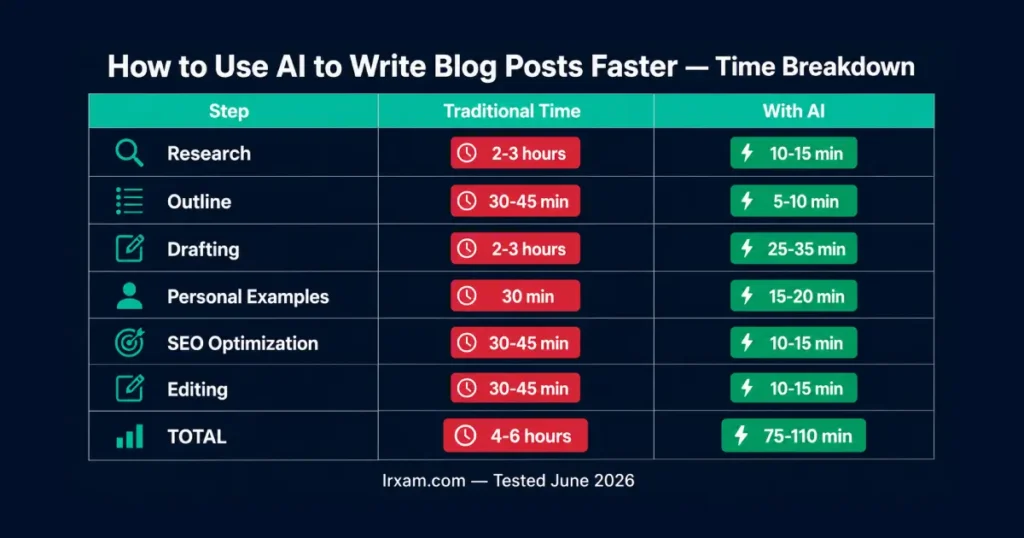
Time Breakdown: AI vs Traditional
| Step | Traditional | With AI |
|---|---|---|
| Research | 2-3 hours | 10-15 min |
| Blog outline | 30-45 min | 5-10 min |
| Drafting | 2-3 hours | 25-35 min |
| Personal examples | 30 min | 15-20 min |
| SEO optimization | 30-45 min | 10-15 min |
| Editing | 30-45 min | 10-15 min |
| Total | 4-6 hours | 75-110 min |
The time savings are real. The quality improvement over pure AI output is also real — this workflow produces blog posts that rank, not just blog posts that exist, enhancing the overall effectiveness of your blog topic.
If you want to go deeper on the tools themselves, our guide to the best free AI writing tools covers which ones work best at each stage of this content creation process.
For a complete look at how blog writing fits into a broader content marketing strategy and overall AI productivity stack, see best AI productivity tools for 2026.
Frequently Asked Questions
How do I use AI to write blog posts faster in 2026?
Use a staged workflow: AI handles research (10-15 min), blog outline generation (5-10 min), and section-by-section drafting (25-35 min). You add the personal examples and opinions only you can provide, then optimize for SEO and edit for voice. Total time: 75-110 minutes for a 1,500-word post, compared to 4-6 hours without AI. The key is treating AI as a writing assistant, not a replacement.
Which AI writing tool is best for blog posts in 2026?
Claude is the best AI writing assistant for long-form blog content — it handles nuanced reasoning and maintains consistent voice across longer posts. ChatGPT is faster for research tasks and outline generation. For SEO-focused blog content specifically, tools like NeuronWriter and Surfer SEO combine content guidance with AI writing features. The right choice depends on where in the workflow you need the most help.
Will Google penalize AI-generated content in 2026?
Not for AI content specifically — Google penalizes low quality and unhelpfulness, not AI authorship. Google’s guidelines penalize low-quality, unhelpful content regardless of how it was produced. Blog posts that leverage AI for speed but add genuine expertise, specific examples, and original perspective consistently rank well. Pure ai-generated content with no human judgment added tends to underperform — not because Google detects AI, but because the content is generic. The workflow above is specifically designed to produce quality content, not just fast content.
How do I make AI-assisted blog posts sound human?
Write section by section rather than generating the entire blog post at once to create content that flows naturally. Add specific personal results and examples that no AI could fabricate. Read the draft out loud and change anything that sounds like a template. Use a grammar checker as the final step. The human elements — your experience, your opinions, your examples — are what make AI-assisted writing sound like a real content creator wrote it.
What are the best prompts to create blog posts with AI?
The most effective prompts are specific about tone, length, and what personal element to include. Instead of “write a section about [topic],” use “write 200 words about [topic] in a direct, first-person conversational tone, including [specific example or data point], without using phrases like ‘in today’s world’ or ‘it’s important to note.'” Specificity is what separates useful AI output from generic blog content.
Can AI help with blog post ideas and content planning?
Yes — this is actually one of the strongest use cases for AI writing tools. Give your AI assistant your niche, target audience, and 3-5 existing posts, then ask it to generate blog post ideas that fill gaps in your current content. Ask it to identify which topics your competitors rank for that you don’t cover. Use it to build a content marketing strategy around keyword clusters rather than individual posts.
How long does it take to write a blog post with AI in 2026?
A 1,500-word SEO-optimized blog post takes 75-110 minutes using this workflow. Research: 10-15 minutes. Outline: 5-10 minutes. Drafting: 25-35 minutes. Personal examples: 15-20 minutes. SEO and editing: 20-30 minutes, a crucial part of the writing process to ensure high-quality content. The time savings compound over a content calendar — at one post per week, that’s roughly 150-200 hours saved per year compared to traditional blog post writing.